
Setting Up Rust Cheats Safely — The 10-Step Wipe-Day Pre-Flight
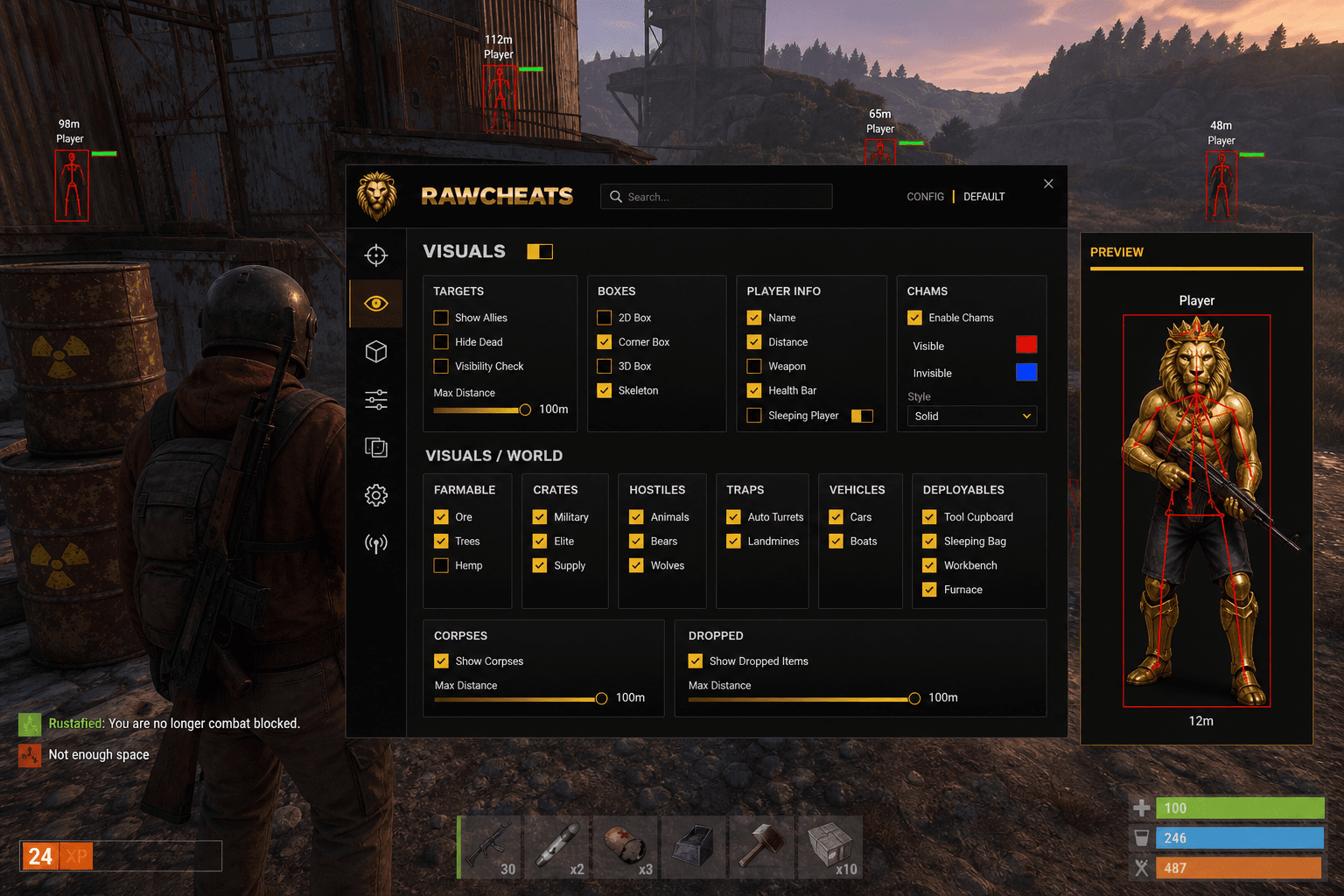
Spoofer-first workflow, cold-boot procedure, OBS streamproof verification, DMA compatibility check. The exact pre-flight that keeps Rust accounts alive.
The single highest-leverage decision you make when cheating in Rust isn't which cheat you buy or how aggressively you tune the aimbot. It's the pre-flight workflow you run before launching the game. Facepunch's detection-time-to-ban dropped to under 7 hours of playtime in 2025 per Surviving 12 Years, which means a single bad session can cost the entire wipe. The cheaters who survive multiple monthly wipes aren't running secret bypass techniques — they're running disciplined pre-flight procedures that prevent the routine mistakes (running the spoofer after EAC initializes, leaking real hardware identifiers through a sleep-cycle, pre-injecting before status confirms UNDETECTED) that produce 80% of preventable bans. Here's the 10-step pre-flight tuned for Rust's Thursday wipe cadence.
This post is a cluster of the Rust Cheats Complete 2026 Guide pillar. The pillar covered the broader Rust market. This piece is the operational checklist.
Why pre-flight discipline matters more in Rust than other games
Three Rust-specific factors compound the value of disciplined pre-flight:
Thursday wipe cadence. Facepunch's first-Thursday-of-month force wipe creates a fixed, predictable high-risk window. Cheats that survive the wipe-day window survive most of the month. Cheats that die in the wipe-day window die immediately after subscribing, which is the worst possible outcome for the customer.
Cross-EAC ban propagation. A Rust ban on EAC fingerprint follows you across every other EAC game on the same hardware. Fortnite, Apex Legends, Dead by Daylight, the Finals, the whole EAC catalog. The blast radius of a Rust ban is broader than a Fortnite-only or Rust-only ban would be.
Premium Servers $15 gate. The fastest path to throwing away $40-100 in Rust account purchases is botching a session in the first hour and eating a ban. The economic stakes per fresh account are materially higher in 2026 than they were 2020-2024.
The pre-flight below is calibrated to these three factors. Skipping steps doesn't save meaningful time and meaningfully increases ban probability.
Step 1 — Verify Raw Rust status
Before doing anything else, check the Raw Rust status page or Discord. Status should be UNDETECTED for the current Rust game version. If status is anything else (DETECTED, UPDATING, MAINTENANCE), don't proceed. Wait for the status to flip.
The most common single-cause ban for established Raw Rust customers is running an outdated build on a newly-patched Rust client. Facepunch ships content patches frequently and EAC ships signature updates between them. A cheat that was UNDETECTED yesterday morning may be DETECTED this morning because of a Facepunch patch overnight. Check status every session.
Status check takes 15 seconds. It prevents the highest-frequency preventable ban.
Step 2 — Cold-boot the PC
Power off completely. Not sleep. Not hibernate. Full shutdown.
Some hardware identifiers (TPM endorsement key reads, certain SMBIOS table caches, driver-state-dependent identifier paths) can persist across sleep cycles. The persistence isn't a security problem normally, but for cheating purposes it means the spoofer's hooks may apply to the post-sleep session inconsistently — some identifiers spoofed, others reading the real underlying hardware. Cold boot resets all the caches to a clean state.
Cold boot takes 60-90 seconds. Skip it and you risk a fingerprint inconsistency that EAC can flag.
Step 3 — Run Raw Spoofer FIRST
Before Steam. Before Discord. Before any application that reads hardware identifiers.
Launch the Raw Spoofer loader. Enter your spoofer license. Click "Spoof." Wait for confirmation that all 16+ identifiers have been rewritten — the spoofer loader will display the spoofed values for each identifier category (motherboard serial, BIOS UUID, disk serials, MAC addresses, GPU UUID, TPM key, etc.).
Verify the values changed. The spoofer should display "before" and "after" hashes for the composite fingerprint. If the after-hash matches the before-hash, the spoofer didn't load properly — restart and try again.
The Rust HWID spoofer guide covers the technical details of what each identifier represents and why session-randomization mode is the default recommended setting.
Step 4 — Launch Steam
After the spoofer, launch Steam. Steam will read some hardware identifiers itself for its hardware-survey telemetry — Steam reads the spoofed values because the spoofer is already resident.
If you're using a fresh Steam account (post-ban recovery scenario), make sure the account has the $15 Steam inventory value to clear the Premium Servers gate. Steam Workshop items, trading cards, or low-value Rust skins all count toward the $15 threshold. The Rust cheat pricing comparison cluster covers the inventory math.
Make sure Steam Family Sharing is disabled if it was previously enabled — family-sharing relationships create hardware-and-account links that EAC can correlate across user accounts. If you have a separate family-shared identity on the same machine, the spoofer breaks the hardware link but Steam's account-link metadata may persist.
Step 5 — Disable potential conflict software
Before launching Rust, close:
- Discord (if you don't need overlay) — Discord's overlay hooks game processes and can interact with cheat injection.
- OBS / Streamlabs / streaming software unless specifically planning to stream with streamproof mode.
- Browser auto-updaters that may trigger driver reloads mid-session.
- Logitech G-Hub, Razer Synapse, Corsair iCUE — these tools modify USB device behavior and can interact with the spoofer's hooks.
- Any other cheat loaders from competitor vendors. One cheat per session.
A clean software environment minimizes the chance of unexpected driver state, kernel hook conflicts, or telemetry inconsistencies that EAC's behavioral layer could flag.
Step 6 — Launch Rust through Steam
Launch Rust through Steam's normal launch button. Don't use a third-party launcher or modified shortcut. Let EAC initialize normally — the EAC bootstrap will read hardware identifiers, get the spoofed values from the spoofer's hooks, composite a fingerprint hash, and authenticate the session.
Watch for EAC error dialogs at launch. The most common is "EAC failed to initialize" which can indicate driver-load conflicts (often from leftover competitor cheat drivers) or Secure Boot misconfiguration. If you see this, exit, troubleshoot the underlying cause, and don't try to inject Raw Rust over a half-loaded EAC session.
Wait for Rust to reach the main menu before proceeding.
Step 7 — Launch Raw Rust loader and inject
Open the Raw Rust loader. Enter your cheat license. Select Rust from the game dropdown. Click "Inject" once you're at the Rust main menu (not in a server, not loading into one — the main menu state).
The cheat overlay should initialize within 2-3 seconds. Default keybind for the menu toggle is INSERT. Open the menu and verify it loaded — check that the version number matches the current build, that the menu is accepting input, and that the visuals/aimbot/misc tabs are all populated.
If the menu doesn't load or shows an older version number, exit Rust completely and restart the loader. Don't inject again into the same Rust process — re-injection over a failed initial inject creates inconsistent runtime state that can trigger telemetry flags.
Step 8 — Configure or load a config slot
Either configure aim, ESP, radar, and misc settings from scratch, or load a saved config slot from Settings -> Configs.
For wipe-day specifically, default to your conservative config:
- Bone priority: Head -> Chest -> Arms -> Legs
- FOV cone: 40%
- Smoothness: 200-250
- Visible-only: ON
- Aim key: Right Mouse Button, Hold mode
- Prediction: ON
- Recoil control: 75%
- Visuals (Players): Cornered boxes, Visibility Color, Max Distance 100m, full PLAYER INFO toggles
- Visuals (World): Tool Cupboard, Auto-turret, Sleeping Bag, Locked Crate, plus contextual entity categories
- Radar: Top-right, medium, FOV cone overlay ON
- Misc: All OFF for the first 48 hours of the wipe
Don't push aggressive settings (max FOV, Thick Bullet, Rapid Fire, Instant Eoka all simultaneously) on the wipe-day session. The post-wipe rush is high-monitoring; conservative settings produce conservative survival rates. The Rust aimbot settings cluster covers per-mode config recommendations.
Step 9 — OBS / streamproof verification (if streaming)
Streamers face an additional risk class: the cheat overlay appearing on stream and the clip leaking to anti-cheat moderators or community ban-trackers. Raw Rust has a streamproof mode that prevents the cheat overlay from appearing in OBS / Streamlabs / NVIDIA ShadowPlay capture frames.
If streaming, verify streamproof is enabled in Settings -> Streamproof. Run a 30-second OBS test recording before going live — record gameplay with the cheat overlay open and confirm the overlay doesn't appear in the recorded video. If it does appear, troubleshoot before going live; do not start a public stream with the overlay capturable.
Streamproof is one of the genuine engineering wins of in-house cheat development. Resellers often don't have streamproof at all, or have it incorrectly implemented such that some capture methods bypass it.
Step 10 — Play conservatively for the first hour
The first hour of a fresh session is when most behavioral-layer detections trigger. Conservative play during the first hour establishes telemetry that looks like a moderately-skilled-human player rather than a fresh cheat session.
Specifically:
- Don't immediately rotate to high-traffic monuments to chain kills. The kill-streak distribution anomaly is one of the cleanest Layer-2 flags.
- Don't snap-flick to long-range targets in the first 5 minutes. Aim-curve anomaly detection is sensitive to fresh-session aim profiles.
- Spend the first 15-20 minutes farming nodes or roaming without engagements. Lets the telemetry stream stabilize.
- After the first hour, ramp into more aggressive engagements.
After the first session, you have telemetry history on the account that the behavioral layer uses as a baseline. Subsequent sessions are lower-risk relative to the fresh-session profile.
Post-flight — when things go wrong
If something goes wrong mid-session:
- Cheat crash or menu freezes: Exit Rust completely before re-injecting. Don't try to recover by restarting the loader in-game.
- Rust crash without cheat issue: Restart Rust normally. The cheat session is already in the Rust process's memory state; a Rust crash invalidates that state cleanly.
- EAC error mid-session: Don't re-launch immediately. EAC errors mid-session can indicate detection. Wait 30+ minutes before re-launching and check status board for community-reported issues.
- Suspect you got banned: Stop playing immediately. Don't try to switch accounts on the same hardware without re-running the spoofer. Wait 24 hours, re-check status, and verify your Steam account ban status before resuming.
Frequently asked questions
Why cold boot? Can't I just restart Rust between sessions? The cold boot resets hardware-identifier caches that don't reset on game restart or even on Windows restart-without-shutdown. The TPM endorsement key cache specifically can persist across soft reboots. Cold boot is the only deterministic reset for the full identifier surface.
How long does the full pre-flight take? 8-15 minutes depending on how many config tweaks you need. Most of the time is cold-boot (60-90 seconds), spoofer verify (60 seconds), Steam launch (60 seconds), Rust launch + EAC initialize (2-3 minutes), inject and verify (1 minute), config (1-5 minutes). The first time through is longest; subsequent sessions are faster as your config slot is already saved.
Can I skip the cold boot if I'm in a hurry? You can. The probability of detection goes up. If you absolutely have to skip, at minimum close all running applications, disable Sleep Mode for the session, and verify the spoofer's before/after hashes show distinct values. But skipping cold boot is the highest-cost shortcut.
What about anti-virus exclusions? Add Raw Rust's loader directory and Raw Spoofer's loader directory to Windows Defender exclusions. The exclusions prevent Defender from quarantining loader binaries it sees as unsigned drivers. Without exclusions, you may see intermittent quarantine events that block injection. The exclusions are documented in the loader's setup wizard.
Should I run on a separate Windows user account? Optional. Some users run cheats on a dedicated Windows user account separate from their work/personal profile. The benefit is that browser-saved credentials and work tools aren't on the same logged-in profile during cheat sessions, limiting the blast radius if anything goes wrong. The cost is the inconvenience of profile switching. Most users don't bother but it's a reasonable hygiene layer.
Is VPN useful for Rust cheating? Marginally. EAC's primary identifier surface is hardware fingerprint plus Steam account, not IP address. VPN obscures your IP from Facepunch's matchmaking and forum-tracking but doesn't bypass the hardware fingerprint. Some users run VPN to obscure ISP-level tracking; it's not load-bearing for ban prevention.
Can I run Raw Rust on a Steam Deck or non-Windows OS? Currently Windows only. Steam Deck (Linux/Proton) is a different runtime environment that EAC handles separately. Most Rust cheats including Raw Rust target Windows specifically because that's where the kernel-mode EAC architecture lives. macOS isn't supported because Rust doesn't have a meaningful macOS player base.
The pre-flight isn't optional. It's the single highest-leverage operational discipline in keeping Rust accounts alive. Get Raw Rust and Raw Spoofer to enable the workflow above. Pair with the Rust aimbot settings cluster for the in-game tuning side, and check the Rust ban wave history for the monthly cadence that determines high-risk session windows.
