
Rust ESP & Loot ESP Features — What Survived May 2025 Culling
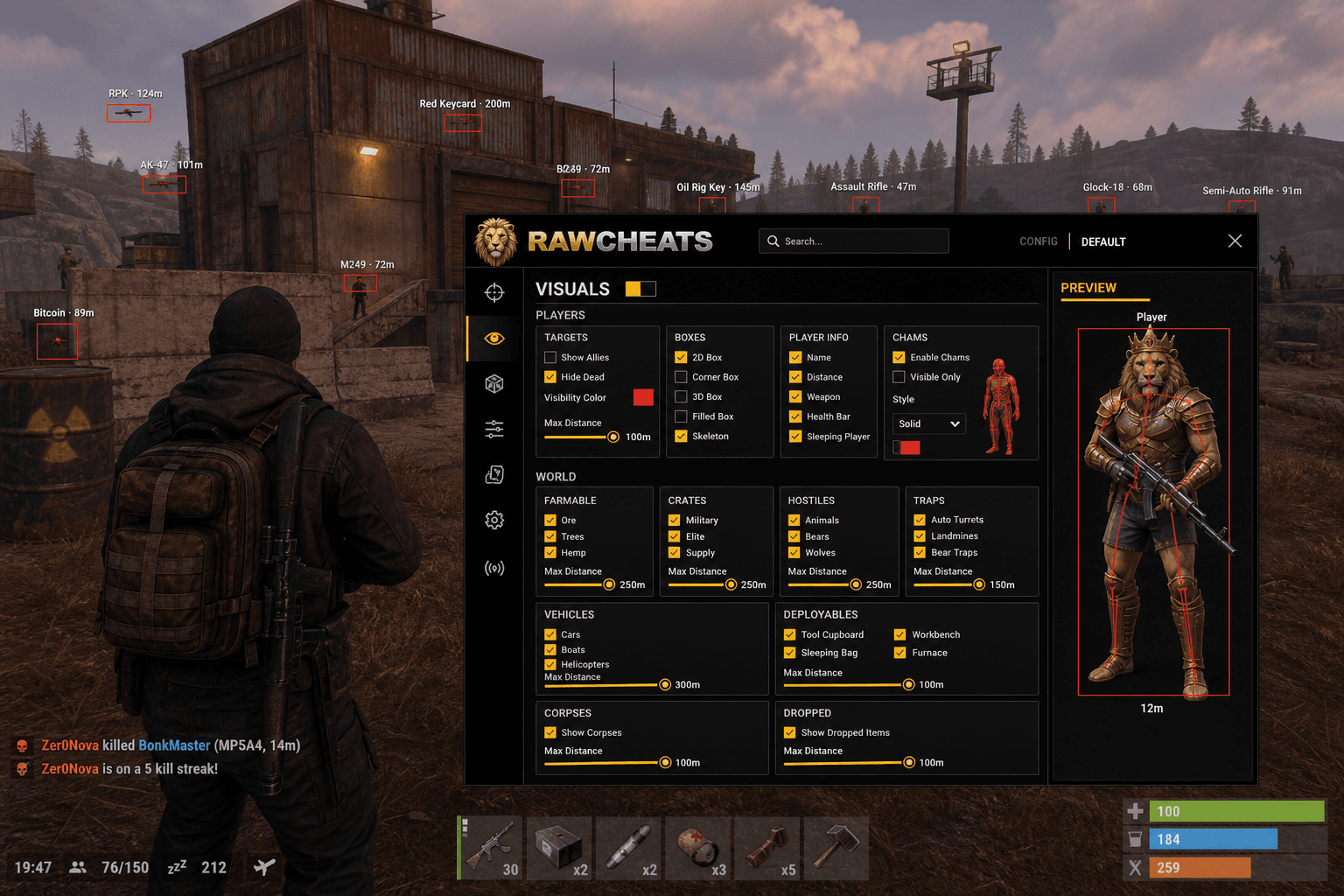
Memory-residue player ESP, six-category world ESP, Tool Cupboard scouting, configurable radar. The post-culling Rust ESP reality and what still works.
Facepunch's May 2025 server-side player-culling rollout is the most under-discussed Rust cheat change of the entire 2025 cycle. The Surviving 12 Years devblog covered it as part of the broader anti-cheat picture, but most cheat vendors are still pretending it didn't happen — their 2026 marketing copy still says "player ESP within 200m through walls" as if the server was still sending position data for occluded players. It isn't. The naive packet-stream ESP that powered Rust wallhacks from 2020 through April 2025 stopped working overnight when culling went live. Here's what survived, what didn't, and how Raw Rust's ESP panel is structured around the post-culling reality.
This post is a cluster of the Rust Cheats Complete 2026 Guide pillar. The pillar covered the broader Rust feature landscape. This piece goes deep on what the ESP panel actually does and which features still produce gameplay value in 2026.
What May 2025 culling killed
Before May 2025, the Rust server transmitted every player's position to every other player within roughly a 200m radius regardless of line of sight. The protocol was straightforward — every tick, every player got every nearby player's coordinates. The 2020-2024 era of "undetected wallhack" was literally just reading those packets off the network stack and rendering boxes at the received positions. The cheat didn't need to touch Rust's game memory, didn't need kernel hooks, didn't need an EAC interaction at all. It was a passive packet sniffer with a render loop.
That model died on the May 2025 rollout. Facepunch deployed a server-side occlusion check that runs for every player-pair every tick. The server tests whether the receiving client can see the sending player (factoring in terrain, building structures, and a short forward-prediction window for players moving into view). If the receiving client can't see the sender, the server doesn't transmit the sender's position. The packet sniffer suddenly receives empty space where occluded enemies used to be.
The marketing tell for 2026: any vendor pitching "player ESP within 200m through walls" as a flagship feature is either misrepresenting memory-residue ESP, labeling radar as ESP, or shipping a 2024 product. The How Rust anti-cheat works cluster goes into the four-layer detection model that pairs with culling.
What survived — three ESP modalities still work
Culling killed packet-stream ESP. It did not kill all ESP. Three specific modalities still function under the post-May-2025 architecture.
Memory-residue ESP. Rust caches recently-seen players client-side for animation continuity — when a player runs behind a wall, their model doesn't snap-disappear from your screen; the client interpolates them out of view smoothly. The cache window varies by movement speed and engagement state but typically holds players for 1-3 seconds after they leave your visible cone. Memory-residue ESP reads the local cache rather than incoming packets, which means it shows you players who just went behind cover. The information is materially less powerful than 2024-era through-wall vision (because the cache window is short and the data goes stale fast), but it's the most reliable post-culling player-ESP option.
Radar (top-down minimap overlay). Radar fuses multiple data sources over time — memory-residue cache, audio cue directional data, dead-body markers, recently-seen extracts, and predicted movement vectors — into a top-down map view. Because radar combines signals across time rather than relying on instantaneous position data, it survives culling better than naive ESP. The map shows you where enemies were and where they probably are now, which is often more actionable in Rust's slow-paced firefights than instantaneous through-wall vision would be.
World ESP (loot, monuments, deployables). Loot crates, monument extract points, locked-crate timers, sleeping-bag spawn locations, Tool Cupboard positions, and base structure data are all server-side persistent state — not player-position state. Culling doesn't touch them because they aren't player movement. World ESP works identically before and after May 2025, and it's arguably the most valuable ESP category in 2026 Rust because it determines whether a raid is worth attempting.
Raw Rust's ESP panel structure
The ESP panel in Raw Rust is organized into four tabs: TARGETS (general toggles), BOXES (player box rendering), PLAYER INFO (label content), CHAMS (model recoloring). Plus a separate VISUALS-WORLD tab with the six-category world ESP grid, and a VISUALS-RADAR tab with the minimap.
TARGETS tab. Four core toggles:
- Team Check — friendlies (squad members on the same teammate group) are excluded from ESP rendering. Prevents the visual noise of seeing your own group's boxes lit up.
- Hide Dead — corpses are filtered out (you can re-enable corpse rendering in the CORPSES section of World ESP). Useful in post-fight zones where the corpse stack would otherwise clutter the screen.
- Visibility Color — different colors for visible vs occluded targets. Standard setup: green for visible (the bot can actually aim at them), red for occluded (memory-residue cached players you can't fire at without exploit features). Color choice is per-user configurable.
- Max Distance — slider 0-1000m, default 100m. Beyond this distance, ESP boxes don't render. Useful for keeping the screen clean during base PvP where 1000m of forest visible would be visual noise.
BOXES tab. Three box styles:
- Box — simple 2D rectangle outlining the player's screen-space bounding box.
- Filled — 2D rectangle with a translucent fill. Higher visual signal in busy fights.
- Cornered — corner brackets only, leaving the center of the box empty. Cleanest in busy fights, less obvious in screenshots.
All three styles support visibility-based auto-coloring (the Visibility Color from the TARGETS tab applies to the box outline).
PLAYER INFO tab. Per-toggle content controls:
- Name — display the player's Steam name above the box. Useful for clan recognition and stream identification.
- Distance — display the meters-to-target value. Critical for ballistic compensation on long-range engagements.
- Weapon — display the player's currently-equipped weapon. Critical engagement-decision data — knowing the enemy has an AK vs a bow changes whether you push.
- Health Bar — display the player's current HP as a bar above the box. Rust-specific feature (Fortnite cheats don't have this; Rust's HP visibility is part of the reason raid scouting works).
- Sleeping Player flag — mark sleeping players differently. Sleeping players in Rust are spawned-but-disconnected — they exist in the world as static targets. The Sleeping flag changes the engagement decision (sleeping players are loot waiting to happen, not threats).
CHAMS tab. Model recoloring through walls. Solid-color player models render over the original geometry. Used selectively because chams are visually obvious and produce stronger detection-attention than box ESP. Recommended for raid scouting only.
The six-category World ESP grid
The VISUALS-WORLD panel is a 3-up grid with six cards. Each card represents a Rust entity category with per-class toggles inside. This is the panel that actually decides raid feasibility in 2026 Rust.
FARMABLE. Ore nodes (sulfur, metal, stone), trees (pine, oak, birch), hemp plants, mushrooms, pumpkins. Useful for early-wipe farming routes and resource-gathering optimization. Per-resource toggles let you show only the categories you're hunting.
CRATES. Military crates, elite crates, supply drops, locked crates (with countdown timers), green tool crates, food crates, basic crates. Locked-crate timers are the highest-value subset here because they determine raid timing — a base with a Tool Cupboard plus an active locked-crate timer is a target with a known unlock window.
HOSTILES. Bears, wolves, scientists (NPC enemies at monuments), CH47 scientists (helicopter event), Bradley Tank crew, patrol helicopter, sharks. Critical for monument PvE where the NPC threat profile changes by location.
TRAPS. Auto-turrets, shotgun traps, landmines, bear traps, flame turrets. Auto-turret ESP specifically is the most impactful subset — knowing turret locations before pushing a base prevents the most common solo-raid death.
VEHICLES. Modular cars, horses, boats (small fishing, RHIB, tugboat, submarine), helicopters (Mini-Copter, Scrap Transport Heli), trains, hot air balloons. Useful for vehicle-hunting wipes and travel-route planning.
DEPLOYABLES. Tool Cupboard, Sleeping Bag, Workbench (T1/T2/T3), Furnace (small/large), Camera, Repair Bench, Mixing Table, Research Table. Tool Cupboard ESP is the single most valuable World ESP feature for raid scouting — TC location determines whether a base is raidable at all (a TC inside a wall stack with auto-turret coverage is a different raid than a TC sitting exposed in a 1x1).
Plus the CORPSES and DROPPED rows below the grid:
- CORPSES — dead player bodies (for looting routes after fights).
- DROPPED — item drops on the ground (from death drops, deliberate drops, or world spawns).
Each category has per-class color and toggle controls. The defaults are tuned for visibility — most users adjust the colors per playstyle (e.g., bright red for traps, dim green for farmable, bright yellow for crates).
The configurable radar
The VISUALS-RADAR tab provides a fully draggable minimap overlay. Sliders for size (small/medium/large/custom-pixel), position (X/Y screen coordinates), zoom level (how much of the surrounding terrain to display), max distance (how far out to render), and an optional FOV cone overlay (shows your camera direction on the radar so you can orient).
The radar renders memory-residue players, dead bodies, recently-seen extract points, audio-cue directional indicators, and your squad-mates. It's the most-used overlay in Rust raid scouting because the top-down view shows you the actual physical layout of the area faster than panning the camera does.
Where radar shines. Open-field PvP where you need to track multiple flanking angles. Raid scouting where you need to know whether a base has external defenders. Pre-wipe monument runs where the audio cues from other players hitting nodes give you advance warning.
Where radar matters less. Indoor base fights where the line-of-sight is already constrained by the building geometry. Long-range sniping where the radar's zoom isn't fine enough to give you the precision you need.
What's NOT in the product (and why)
Some features competitor vendors market that Raw Rust deliberately doesn't ship:
- Hero Name ESP. Rust isn't hero-based. There's no "Tracer / Sigma / Genji" identification because there are no hero characters. Every Rust player is the same model with different cosmetic skins.
- Build macros. Rust isn't a build-shooter. There's no auto-90s or turbo-build feature class because the game doesn't have building during fights — Rust building is base construction, which happens out of combat with no time pressure.
- Ultimate Tracker. Not a hero-shooter. There's no ultimate ability timer because there are no ultimate abilities.
- Bus list overlay. Not a battle royale. There's no pre-drop lobby with team-count display.
A vendor that markets any of these features for Rust is either repurposing copy from another game's product page or selling vapor.
Tuning ESP for the play mode
Default ESP setup that works for most wipes:
- Player ESP: Cornered boxes, Visibility Color ON (green visible, red occluded), Max Distance 100m, Name + Distance + Weapon + Health Bar enabled, Sleeping Player flag enabled, Team Check ON.
- World ESP (TARGETS): Tool Cupboard ON (always), Auto-turret ON (always), Sleeping Bag ON (always), Locked Crate ON.
- World ESP (CRATES): Military + Elite + Supply Drop ON, others contextual.
- World ESP (TRAPS): All ON (you don't want to miss a landmine).
- World ESP (VEHICLES): Contextual to wipe type.
- World ESP (DEPLOYABLES): TC + Workbench + Furnace ON, others contextual.
- Radar: Top-right corner, medium size, zoom 50m radius, FOV cone overlay ON.
For sweaty server play or streaming, swap the box style to Cornered (less screenshot-visible) and reduce the player-info content to Name + Distance (drop the weapon and health bar from the visible labels — they're still readable via the menu, just not on-screen). The Rust aimbot settings cluster covers the aim-side complement to this ESP setup.
Frequently asked questions
How short is the memory-residue cache window in practice? Highly variable. For a stationary player who just ducked behind a rock, the cache holds for 2-3 seconds before going stale. For a sprinting player who broke line-of-sight at full speed, the cache may go stale within 0.5-1 seconds because the predicted position drifts too far from the actual server-side position. Memory-residue ESP shows you the last known position with a fading confidence indicator; the box becomes less reliable the longer the cache has been since the last update.
Is World ESP more useful than Player ESP in 2026 Rust? For most raids, yes. Knowing exact Tool Cupboard location, locked-crate timers, and auto-turret coverage decides whether a raid is worth attempting. Player ESP through walls is most valuable in open-field PvP where the player IS the loot. Raid scouting is dominated by World ESP. Roaming and farming sit in between.
Does the radar work with audio cues from players? Yes — the radar fuses audio-cue directional data (gunfire, footsteps, hits on nodes) into the displayed positions. Audio cues are most useful when a player is outside your memory-residue cache (so the player-ESP box is gone) but still making audible noise. The radar will show their general direction even when the visual ESP can't render them.
Are chams more detectable than box ESP? Marginally, in the modern detection environment. Chams modify the rendered geometry layer, which is more visible to some kinds of anti-cheat capture-frame analysis than the overlay-layer box rendering. The detection-attention difference is small but real; conservative users use cornered boxes by default and reserve chams for raid scouting where through-wall visibility is critical.
Can I save different ESP configs per server / wipe type? Yes. Raw Rust supports per-user config slots — save your sweaty config and your wipe-day config separately, swap between them with one click. This is one of the genuine UX wins of the shared-SDK across all six products: same config-slot system on Raw Rust as on Raw Fortnite, Raw Overwatch, etc.
Does the ESP show clan tags or premium-server status? Steam name shows in the Name label. Clan affiliation is not surfaced (Rust doesn't have a server-side clan API). Premium-server status is irrelevant because if you're connected, you've already cleared the gate.
What's the detection-attention difference between Player ESP and World ESP? World ESP has materially lower attention because the data it reads (server-side persistent state) is the same data legitimate Rust mods (RustEdit, Centralized Banlist, monument-info plugins) also read. Player ESP reads game memory that legitimate gameplay doesn't expose. Detection-wise, World ESP is closer to "wallhack on map info" than "wallhack on enemies." Both are detected eventually; World ESP windows are typically longer.
The post-culling Rust ESP reality is six-category world ESP plus memory-residue players plus configurable radar. Get Raw Rust for the full ESP panel including the Tool Cupboard scouting that decides whether a raid is worth attempting. Pair with Raw Spoofer before every session. Read the How Rust anti-cheat works cluster for the detection-side context, and the Rust aimbot settings cluster for the aim-side complement.
