
Setting Up Marvel Rivals Cheats Safely — Pre-Flight Checklist
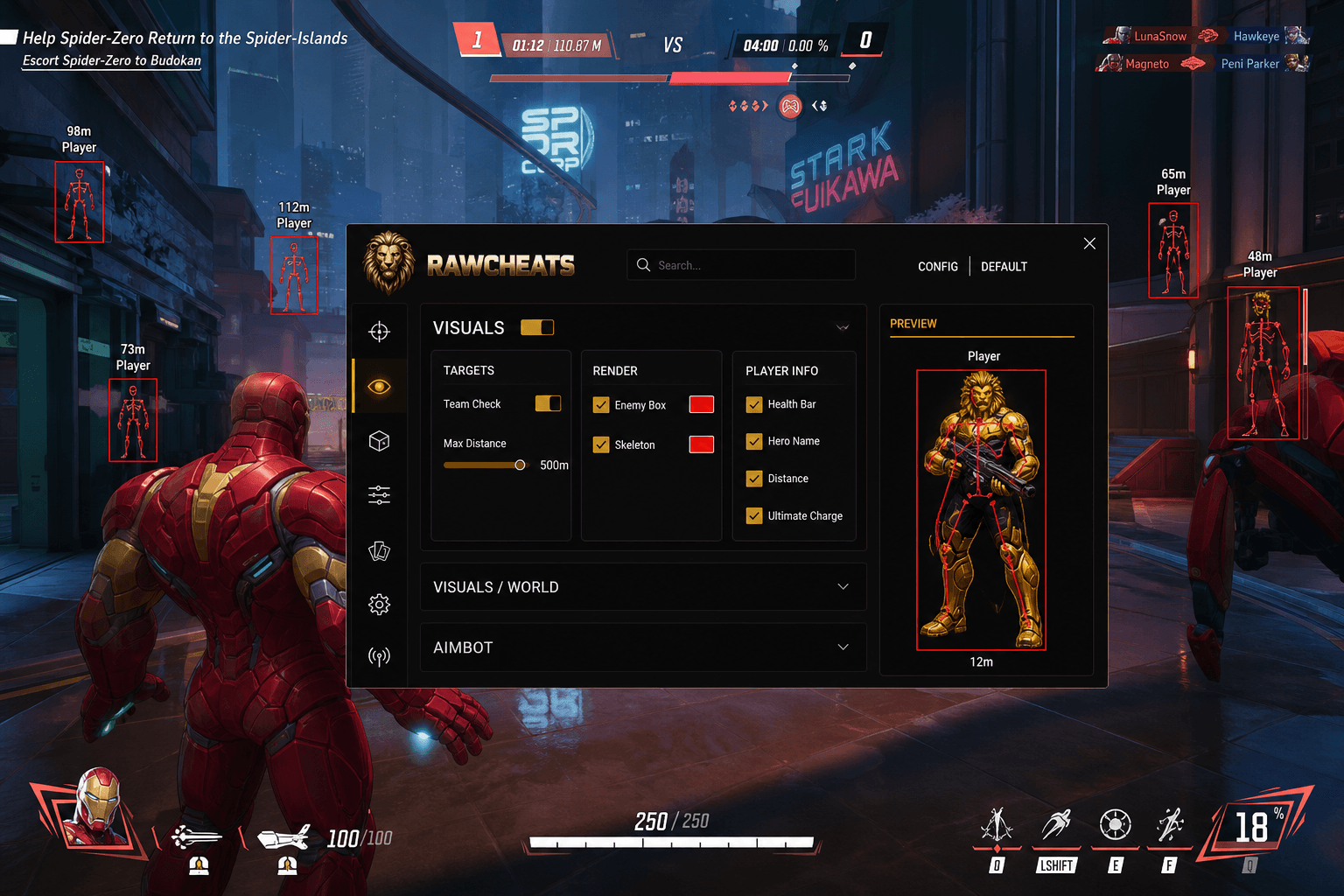
Spoofer-first workflow, conservative tuning baseline, S8 patch-day timing. The pre-flight checklist for NeacSafe-aware Marvel Rivals cheat use.
The single highest-risk Marvel Rivals session of any month is the 6-hour window after a content patch lands. The second highest is the first session after a fresh OS install where you haven't yet run the spoofer. The third is any session where you've stacked aggressive aimbot tuning on top of a fresh account with no prior gameplay history. All three are avoidable with a 10-minute pre-flight checklist before each session. Most cheat-buying guides skip this; we treat it as the load-bearing part of safe Marvel Rivals cheat use.
This post is a cluster of the Marvel Rivals Cheats Complete 2026 Guide pillar. The pillar covered the headline risks. This piece is the actual procedural walkthrough — pre-flight, in-session, patch-day, and the hygiene practices that keep accounts alive across NeacSafe's continuous-detection model.
The pre-flight checklist (10 minutes before queueing)
Before each Marvel Rivals session — or at minimum before each new Windows boot — run through this sequence.
Step 1 — Cold boot or fresh login. Don't carry session state from previous browsing / Discord / VPN configurations into the cheat-running session. Cold boot ensures the OS is in a clean state and the spoofer's session randomization is fully fresh.
Step 2 — Verify Windows Defender is enabled and updated. Counter-intuitively, the spoofer + cheat workflow works better when Defender is in its default state. Disabling Defender entirely is a tell that NeacSafe's behavioral telemetry watches for (NetEase's system probes "did the user disable AV to install something suspicious?"). Defender's exclusions for Marvel Rivals + cheat directories are sufficient; full disable is not necessary.
Step 3 — Close all browsers, Discord, Steam. Browser tabs and Discord clients hold session state that infostealers from past compromises (if any) could exfiltrate. Cold-close everything before running the spoofer.
Step 4 — Run Raw Spoofer as administrator. Right-click → Run as Administrator. Enter your spoofer license. The spoofer randomizes the 14 hardware identifier categories it covers (see the HWID spoofer cluster for the per-category list). Verify the status shows "Spoofed" before continuing.
Step 5 — Verify cheat status is UNDETECTED. Check the Marvel Rivals cheat status page. If status is anything other than UNDETECTED — PATCHING, DETECTION_REVIEW, OFFLINE — do not queue. Waiting 6 hours for status to flip is cheaper than eating a ban.
Step 6 — Launch Raw Rivals loader. Enter cheat license. Select Marvel Rivals from the game dropdown.
Step 7 — Launch Marvel Rivals through Steam. Steam → Marvel Rivals → Play. NeacSafe loads at game start; the spoofer's kernel intercepts handle the hardware identifier reads.
Step 8 — Inject the cheat. When you reach the Marvel Rivals main menu, click "Inject" in the Raw Rivals loader. Wait 2-3 seconds for the cheat menu to overlay (default keybind: INSERT).
Step 9 — Verify configuration. Open the cheat menu (INSERT). Confirm your saved config is loaded. Verify the conservative tuning baseline is in place — FOV under 35%, smoothness above 250, visible-only ON, prediction ON, Silent Aim OFF.
Step 10 — Queue. You're good. Play conservatively, watch your headshot rate, don't run aggressive Silent Aim in ranked.
The 10-minute pre-flight feels long the first time. By session 5 you're doing it in 3 minutes. The discipline is what keeps accounts alive.
The spoofer-first principle
Order matters. The spoofer has to be running before NeacSafe reads hardware identifiers, not after.
When Marvel Rivals launches, NeacSafe reads ~16 identifier categories within the first second. If the spoofer's kernel intercepts are in place at that moment, NeacSafe reads spoofed values; if not, NeacSafe reads your real hardware. There is no retroactive fix — you can't run the spoofer after launching Marvel Rivals and have it work.
The order is invariant: Cold boot → Spoofer → Cheat loader → Marvel Rivals → Inject. Skipping any step in this sequence (especially the spoofer step) is the single most common preventable mistake on this game.
Common variation: re-queueing after a single session. If you've played one match and want to queue another, you do not need to re-run the entire pre-flight. The spoofer state persists for the boot session. Just queue. If you've rebooted Windows between sessions, run the full pre-flight again.
Common variation: launching a different NetEase game. If you've been playing Marvel Rivals with the spoofer and want to switch to Naraka: Bladepoint, the spoofer state covers Naraka too. Just launch Naraka. The cross-NetEase consistent identity (covered in the HWID spoofer cluster) means the spoofed fingerprint applies across all NetEase games in the boot session.
The conservative tuning baseline (load this config on every session)
Aggressive tuning is the second most common preventable mistake on Marvel Rivals (after spoofer-skipping). NeacSafe's behavioral telemetry catches statistical anomalies; conservative tuning keeps you under the threshold.
The baseline for ranked Diamond+ play:
- Aimbot FOV: 25-35%
- Aimbot Smoothness: 250-400
- Hitbox Priority: Chest → Head → Arms → Legs on Vanguards; Head → Chest → Arms → Legs on Duelists
- Visible-Only: ON
- Role Filter: All three on (Duelists / Vanguards / Strategists) by default
- Prediction: ON (auto-handles projectile heroes)
- Silent Aim: OFF
- ESP Box: ON, red
- ESP Skeleton: OFF or thin gray
- ESP Health Bar: ON
- ESP Hero Name: ON
- ESP Distance: ON
- ESP Ultimate Charge: ON
- ESP World / Health Packs: ON, 50m max
This baseline produces aim profiles that survive both NeacSafe's behavioral telemetry and human spectator review at Diamond / Eternity ranks. The aimbot settings cluster covers tuning rationale and per-role adjustments in detail.
For tournament play, tighten further — FOV 10-25%, smoothness 400-500, ESP boxes only (skeleton off), and absolutely no Silent Aim. The conservative baseline is the default; tournament tuning is more conservative.
For casual / quick play / pubs, you can run more aggressive tuning (40-60% FOV, 200-300 smoothness, Silent Aim situationally) because there's no replay review and the demographic is lower-skill. The detection risk profile is the same as ranked, though, so we recommend the conservative baseline even in pubs.
In-session hygiene
Once you're queued and playing, several practices matter.
Watch your headshot rate. Marvel Rivals shows post-match statistics including headshot percentage. Sustained headshot rates above ~60% across 20+ matches will eventually flag for review. Conservative tuning produces headshot rates in the 40-55% range — visible improvement, not anomalous. If you're consistently above 65%, tighten your tuning.
Don't run the cheat against AI / training mode. NeacSafe's behavioral telemetry includes training-mode behavior. Running aggressive aim assist in AI matches is data NetEase ingests for behavioral fingerprinting. Either play training mode without the cheat or skip training mode entirely.
Don't change configs mid-match. Switching between aggressive and conservative configs during a match produces inconsistent aim patterns that flag as suspicious. Pick a config before queueing and stick with it for the match.
Don't share kill cam footage with cheat overlay visible. Marvel Rivals' kill cam can show what was on the killer's screen. The cheat overlay is hidden from the kill cam stream (the cheat rendering layer is separate from the game's render output), but be cautious — if you record gameplay for clips, verify your recording doesn't capture the cheat overlay. The cheat's preview pane shows what's visible to OBS / capture cards; review before posting.
Patch-day timing — the riskiest window
Marvel Rivals content patches land roughly every 6-8 weeks. The patch window is the single highest-risk session of any month. Here's the protocol.
T-24 hours: Pre-patch. The day before a known patch (patch notes are typically leaked / announced 24-48 hours ahead), close your cheat session. Don't queue Marvel Rivals in the 6 hours before patch. Loose offsets between the game's expected schema and your cheat's read profile produce anomalous reads as the game prepares for the patch.
T-0: Patch lands (~9am PT). Steam pushes the patched client. NeacSafe driver may update simultaneously. Game state schemas change. Cheat behavior is undefined during this window. Memory addresses your cheat reads may now point to different fields, producing inconsistent state reads that NeacSafe's behavioral telemetry detects.
T+0 to T+6 hours: Patch-day risk window. Do not queue Marvel Rivals. Status will show PATCHING on the Marvel Rivals cheat status page. Wait.
T+6 to T+12 hours: Cheat rebuild window. Operators ship patched builds with updated offsets, updated bypass tuning for any NeacSafe behavioral changes, and verified working state. Status flips to UNDETECTED. The pause-the-subscription-clock policy means you don't pay for the downtime.
T+12+ hours: Safe to queue. Pre-flight checklist as normal.
The patch-day discipline is non-negotiable. Players who queue immediately after a patch land — "just to see if it still works" — are the single largest source of preventable bans on Marvel Rivals. The cheat may seem to work for the first match; NeacSafe's behavioral pipeline catches the schema-drift anomalies and the ban lands a few hours later.
Account hygiene — the post-cheat-purchase practices
Beyond per-session pre-flight, several longer-term practices matter for cheat-account longevity.
Use a clean account for cheat sessions. Don't run cheats on your main Steam account. Create a secondary Steam account, buy Marvel Rivals (free-to-play — no cost), and run cheats on that account. Even if you eat a ban, your main account is untouched. The cross-NetEase HWID ban consideration still applies (the hardware fingerprint is what's banned, not the Steam account), but at least the Steam account itself is replaceable.
Don't link the cheat account to your social identity. No real Discord linked. No real Twitch linked. No real email tied to the rest of your online presence. The cheat account should be functionally anonymous from your main online persona.
Maintain plausible play history. Don't queue immediately into ranked on a fresh account with cheat enabled. Play 20-30 unranked / casual matches first without the cheat (or with the cheat at extremely conservative settings) to build a baseline of "this is a player who plays Marvel Rivals normally." NetEase's behavioral models build expectations against your play history; sudden anomalous performance on a fresh account flags faster than the same performance on an account with 200 hours of established gameplay.
Don't stream / record / post highlights from cheat sessions. Public visibility brings spectator review. Even at low rank, public highlights inviting "this guy has aim cheats" comments accelerate the manual review pipeline.
The Steam Deck / Proton "don't do it" rule
Marvel Rivals runs on Steam Deck via Proton. Raw Rivals does not. The January 2025 NetEase false-positive wave (see the ban wave history) is the canonical reference for Proton-related NeacSafe instability.
If you play Marvel Rivals on Steam Deck or macOS via Crossover, don't run cheats. The cheat is designed for native Windows kernel-mode behavior; running it through Proton's compatibility layer produces unpredictable behavior. Stick to native Windows for cheat sessions.
If you have both a Windows desktop and a Steam Deck, run cheats only on the desktop. Play Marvel Rivals on Steam Deck without the cheat.
What to do if status flips to PATCHING mid-session
You're mid-match. You check the status page or Discord and see PATCHING. Standard response:
- Finish the current match (don't quit mid-match — that has its own behavioral flag).
- Close Marvel Rivals immediately after.
- Close the cheat loader.
- Wait for status to flip back to UNDETECTED.
- When status returns, run the pre-flight again (re-run spoofer, re-launch cheat loader, etc.).
Do not queue another match while status is PATCHING. This is the highest-risk decision on the game. Worth repeating: do not.
What to do if you suspect detection has already landed
Sometimes detections fire silently — your session continues but your account is flagged for action. Signs:
- Sudden "Cannot connect to server" repeating errors
- Account showing as logged-in on a different IP
- Steam alerts about unusual activity
- Marvel Rivals launcher closing immediately without error
If any of these happen:
- Close everything.
- Disconnect from the internet.
- Run a full malware scan from a different boot environment (boot from USB Linux, scan Windows partition for stealers).
- Change passwords on Steam / Discord / banks / crypto from a clean device.
- Don't re-launch Marvel Rivals — the detection has fired; queuing again just confirms the hardware fingerprint to NetEase.
- Contact Raw Rivals support Discord. We can advise on next steps including HWID-reset workflow.
If the ban has already landed on Marvel Rivals, the hardware fingerprint is in the cross-NetEase ban table. Recovery requires either (a) full hardware replacement or (b) a spoofer that covers all 16 identifier categories with new randomization. Raw Spoofer handles option B; see the HWID spoofer cluster for the technical detail.
The summary checklist
For quick reference, here's the entire pre-flight + in-session protocol in a single block:
Pre-flight (every session):
- Cold boot Windows
- Close all browsers / Discord / Steam
- Run Raw Spoofer as administrator
- Verify cheat status UNDETECTED at /marvel-rivals-cheat-status
- Launch Raw Rivals loader
- Launch Marvel Rivals via Steam
- Inject cheat at main menu
- Verify conservative config loaded
- Queue
In-session:
- Watch headshot rate (keep under 60% sustained)
- No training mode with cheat enabled
- No config switching mid-match
- Don't record / stream cheat sessions
Patch-day:
- Stop queueing 6 hours before patch
- Wait for status UNDETECTED post-patch
- Re-run pre-flight checklist
Account hygiene:
- Use a clean secondary Steam account
- Don't link cheat account to real identity
- Build plausible play history before competitive
- No public visibility of cheat sessions
Steam Deck / Proton:
- Don't run cheats on Steam Deck or macOS
The pillar Marvel Rivals Cheats Complete 2026 Guide covers the broader product context. The HWID spoofer cluster covers the cross-NetEase risk in technical detail. The free cheats warning cluster covers why "I'll just use a free one" is the worst possible decision on this game.
