
Setting Up Arc Raiders Cheats Safely — The One-Strike-Permaban Setup Workflow
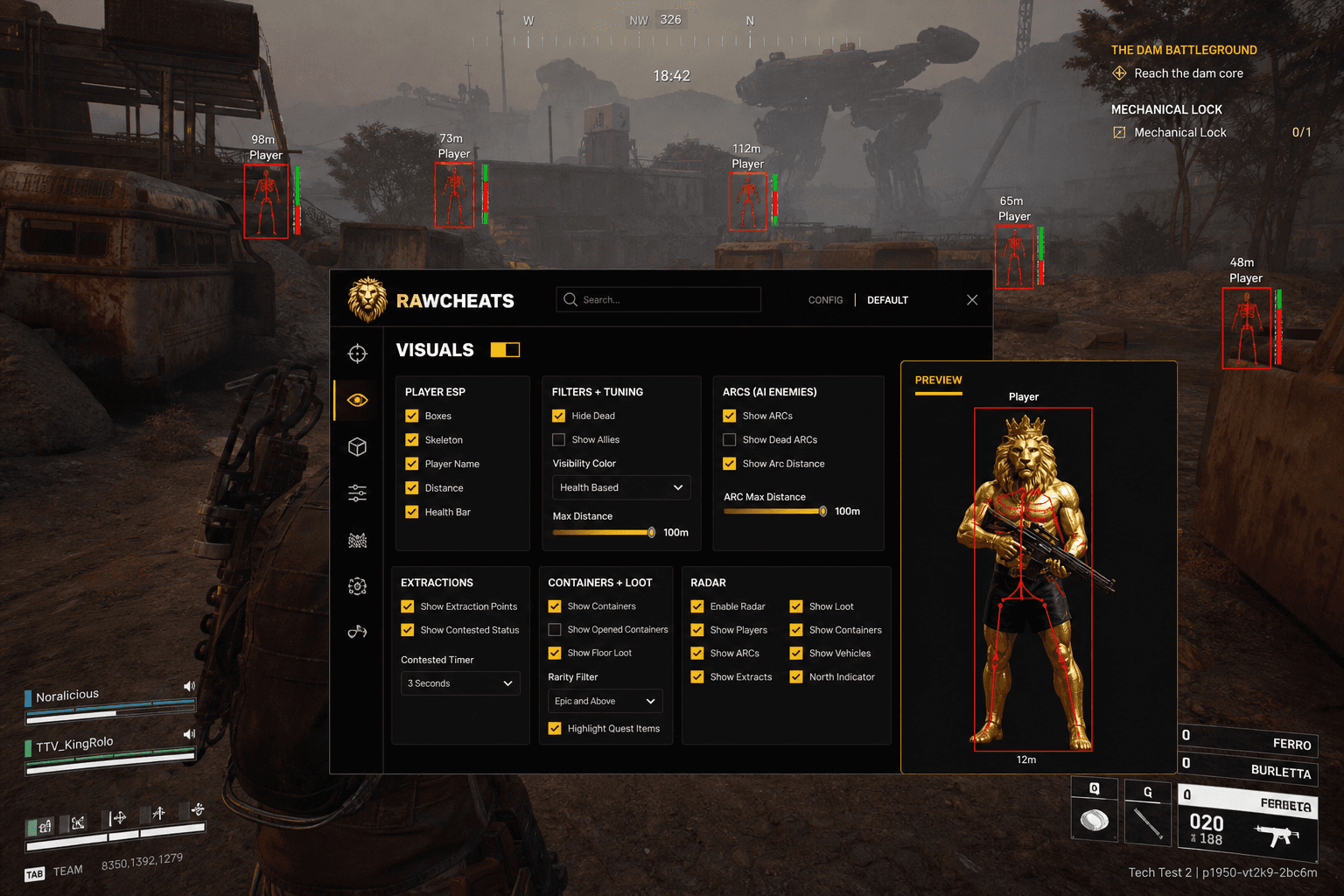
Pre-flight checklist for Arc Raiders cheats tuned for the one-strike permaban environment. Conservative defaults, Misc panel timing, behavioral evasion principles.
Most Arc Raiders cheat-setup guides on competing sites are ports from Fortnite or Apex tutorials with the game name swapped. They miss the structural differences that make Arc Raiders setup meaningfully different — the late-February 2026 one-strike permaban policy (covered in the pillar), Anybrain's ML behavioral telemetry that catches greedy tuning faster than EAC's signature scanner ever does, and the cross-EAC ban cascade that takes out your Fortnite, Apex, Rust accounts when something goes wrong. Setting up Arc Raiders cheats in 2026 requires a different mental model than setting up cheats on any other RawCheats pillar product. The same loader works. The pre-flight discipline is different. Here's the workflow that survives Arc Raiders' one-strike environment.
This post is a cluster of the Arc Raiders Cheats Complete 2026 Guide pillar. The pillar covered the broader policy context; this cluster is the specific setup discipline that protects against permaban.
Pre-flight checklist before your first session
Before you launch the cheat, verify each item. Skipping any of these is structurally how people eat permabans.
Hardware spoofer purchased and tested. Raw Spoofer is non-optional for Arc Raiders due to cross-EAC propagation. If you haven't bought the spoofer yet, buy it before you buy the cheat. The HWID spoofer cluster covers why — one Arc Raiders HWID ban takes out Fortnite, Apex, Rust, DayZ on the same hardware.
Steam / Embark account separation. Don't use your main account for first-session cheat usage. Create a separate Steam account on a separate email, buy Arc Raiders fresh, and use that as your cheating account. If something goes wrong (HWID propagation aside, account bans are individual), you don't lose your main account history.
Different IP than your legit account. Optional but recommended. If you use the same IP for your legit and cheating accounts, Steam's account-pattern matching can correlate them. A VPN with a different endpoint per account adds protection. Don't use free VPNs — most leak DNS or have malware bundled.
Hardware status verified. Run a hardware-info tool before you start (CPU-Z, GPU-Z, any free one) and note your actual hardware identifiers. After the spoofer runs, check again. If the values match your actual hardware, the spoofer didn't load correctly — restart before launching the cheat.
Cold-boot Windows. Don't run Arc Raiders or any EAC game in the Windows session you'll use for cheating until the spoofer has run. EAC may have cached your real fingerprint from a prior legit session. Cold boot fresh.
Disable hardware sleep / hibernation during the session. Windows' modern standby state can write the spoofed values to disk and create persistence issues across sleep cycles. Set power settings to "high performance" or equivalent and keep the machine awake throughout the session.
Stable internet connection. Anybrain runs server-side. If your connection drops mid-match, the telemetry batch sent during reconnection can include enough information to trigger flags. Use wired Ethernet if possible. WiFi is fine but flaky WiFi is a liability.
The session-start sequence
Once your pre-flight is clean, the session workflow:
-
Cold-boot Windows. Boot fresh into a session that hasn't run Arc Raiders or any EAC game yet.
-
Run Raw Spoofer as administrator. Right-click → Run as administrator. Windows UAC prompt: yes. Enter your spoofer license. The driver loads and applies randomized hardware identifiers across all 16 categories (see the HWID spoofer cluster for the full identifier list). The console output confirms each category's randomization.
-
Verify the spoofer is active. Open a hardware-info tool and confirm displayed values don't match your real hardware. Match = restart. Don't proceed until verification passes.
-
Launch Raw Arc Raiders loader as administrator. Enter cheat license. Select Arc Raiders from the game dropdown. The loader does its own pre-injection sanity check against the spoofer state.
-
Launch Arc Raiders via Steam. Wait for the main menu to fully load. EAC initializes during launch and reads spoofed hardware identifiers as if they were your real hardware.
-
At the main menu, return to the loader and click Inject. Cheat menu overlays within 2-3 seconds. Default keybind: INSERT.
-
Configure conservative defaults before queuing into a match. Don't queue with default-out-of-box settings — they're tuned for menu screenshots, not for survival. The next section covers tuning.
-
Play. End of session, exit Arc Raiders, exit cheat loader, exit spoofer. Don't leave the spoofer running between sessions; let it reset cleanly each time.
Conservative defaults for first 10-15 hours
The first 10-15 hours of cheat usage on a new Arc Raiders account are the highest-risk period. Anybrain's behavioral model has the least telemetry on your specific account, which means small statistical anomalies trigger flags more readily than they would after the model has more data. The conservative-tuning baseline is structurally important during this window.
Aimbot tab — first 10 hours:
- Hitbox priority: Chest → Head → Arms → Legs (chest-priority caps your headshot rate in the 30-50% range, which Anybrain reads as high-skill human)
- FOV cone: 20-25° (tight cone, no machine-tracking-the-whole-screen patterns)
- Smoothness: 350-400 (third-person camera math + Anybrain angular-velocity tolerance)
- Visible-only filter: ON (mandatory)
- Prediction: ON (handles projectile drop without manual sliders)
- Aim Key: Right Mouse Button, Hold mode (not Always, not Toggle)
- Silent Aim: OFF completely
Visuals tab — first 10 hours:
- Player ESP: Box + Name + Distance only (Skeleton OFF, Health Bar OFF — minimize render footprint)
- Filters: Hide Dead ON, Show Allies appropriate to your party, Max Distance 80m
- ARCs: Show ARCs ON, Distance ON, Max Distance 60m
- Extractions: Show Extraction Points ON (mandatory — highest-utility feature)
- Loot: Rarity filter Legendary + Prototype only (minimize visual surface), Quest Items ON
- Radar: Players + ARCs + Extractions only
Misc panel: OFF entirely for the first 10 hours. The no-recoil, no-sway, magic bullet, and third-person Silent Aim features are higher-risk in Arc Raiders specifically because of the one-strike policy. Don't enable any of them until your account has established legit-feeling telemetry on the legit-tuned baseline.
Settings tab:
- Config slot: save the conservative profile as "Conservative Default"
- Keybinds: minimal, avoid Always-active toggles
- Performance: cap FPS to your monitor refresh rate (no above-monitor FPS, which can create input timing anomalies)
Hours 10-25 — gradual escalation if everything is working
After 10-15 hours of clean play with the conservative baseline, if your account hasn't received any flags and the cheat is operating normally:
Optional: enable Silent Aim at 60-70% hit chance. Bind to a separate key (side mouse button) so you can engage it situationally rather than always. Use sparingly on contested engagements where the visible-crosshair-off-target behavior matters.
Optional: enable specific Misc panel features. No-recoil is the lowest-risk Misc feature; consider enabling it first. Don't stack multiple Misc features at once. One feature at a time, validated over 5-10 hours before adding another.
Don't expand FOV cone beyond 25° or drop smoothness below 350. These two parameters are the structural defense against Anybrain. Even after extensive legit telemetry, expanding the FOV or dropping smoothness re-triggers behavioral flags.
Continue running the spoofer every session. The spoofer isn't a one-time setup — it's per-session protection. Cold boot, spoofer, cheat, every time.
Hours 25+ — established profile
After 25+ hours of clean play with conservative-plus-occasional-Silent-Aim usage:
Your account has accumulated enough legit-feeling telemetry that Anybrain's model has a baseline for your specific account. Future anomalies are evaluated against that baseline rather than against the population average. This is a marginally lower-risk operating point than the early hours.
Don't overreach. Even an established profile gets flagged if you suddenly switch to maxed settings. The behavioral evidence of "this account played 25 hours at conservative settings, then suddenly hit 80%+ headshot rate" is a structural flag. Conservative remains the operating ceiling, with situational Silent Aim usage layered on top.
Periodic config validation. Every 2-4 weeks, restate your tuning is still inside the safe band. EAC and Anybrain models evolve; what's safe today may not be safe in three months. The Arc Raiders cheat status page tracks current detection windows; check it before extended sessions.
What to do if you see suspicious account behavior
Signs that something has gone wrong:
Sudden matchmaking lobby quality change. If you're suddenly being matched with much worse or much better players than your usual pool, the matchmaker may be shadow-throttling you (placing you in a "suspected cheater" pool while detection finalizes).
Disconnects mid-match without obvious cause. Forced disconnects can indicate session-level anti-cheat activity. Real disconnects happen too; not every disconnect is a flag, but a pattern of them within sessions is suspicious.
Spoofer warning indicators. If the spoofer reports incomplete coverage on any of the 16 identifier categories, exit the session immediately and don't play until you've troubleshot the spoofer.
Login prompts from Steam or Embark out of cycle. "Verify your account" emails or login challenges that aren't tied to your actual login activity can indicate account-side review. Don't ignore them.
If you see any of these, exit the session, exit the cheat, exit the spoofer. Don't play Arc Raiders for the next 24-48 hours. Check the Arc Raiders cheat status page for vendor updates. If the issue persists after a status update, you may need to wait for the next bypass build.
Steam Deck and Linux — not supported
Raw Arc Raiders is Windows-only. The cheat's driver layer assumes Windows kernel-mode operation and the SMBIOS / TPM read hooks are Windows-specific. Steam Deck runs Arc Raiders under Proton (compatibility layer for Linux), which adds inconsistency that we don't support.
If you're a Steam Deck or Linux player, you can't run our cheat. There are no third-party alternatives we can recommend either — running cheats through Proton's compatibility layer adds detection surface that no current vendor has engineered around. Plain legit play is the only viable option on these platforms.
What not to do during the session
Don't use the cheat in raids where your legit-account friends are also playing. Embark hasn't formally announced account-link bans (similar to Overwatch's Season 3 grouping policy), but Anybrain's behavioral models can correlate party composition with detection events. If your friend on the same squad eats a flag for being grouped with you, the social cost amplifies. Don't combine legit and cheat play in the same party.
Don't post screenshots or clips with the cheat menu visible to public spaces. Discord servers, Twitter, YouTube, Twitch — anywhere your account's identity might be linked to the cheat menu screenshot. The menu visuals are recognizable to Embark's anti-cheat team; public exposure of "user X is using Raw Arc Raiders" creates a manual review case file.
Don't stream or record gameplay with the cheat active without OBS-style scene compositing. If you're recording or streaming, ensure the cheat menu and ESP elements don't appear in the captured output. The setup guide on streaming-safe cheating covers the technical approach if you stream.
Don't queue ranked or competitive immediately after enabling new Misc panel features. Test new features in casual / unranked first. Validate they work for your hardware and don't trigger flags. Then commit to ranked.
The Layer 4 incoming change
Embark's May 7, 2026 Ensuring Fair Play dev blog announced a new kernel-level AC in active testing. Deployment timeline unconfirmed, expected Q3 2026. When Layer 4 deploys, expect the following:
- Brief detection downtime on most cheats as bypass engineering catches up to the new layer. The standard SLA for active-engineering vendors is 6-12 hours; passive resellers will be down longer.
- Tightened behavioral profile requirements. Layer 4 may add new behavioral signals beyond what Anybrain currently tracks. Conservative tuning becomes structurally more important.
- Possible changes to the HWID identifier surface. If Layer 4 reads new identifier categories beyond the current 16, the spoofer will update to cover them.
The setup workflow above is forward-compatible with Layer 4. The disciplined approach (cold boot, spoofer, conservative tuning, established baseline before escalation) works whether the AC stack is current EAC + Anybrain or future EAC + Anybrain + Layer 4. Don't try to anticipate Layer 4 before deployment; just maintain discipline.
Frequently asked questions
Can I skip the cold boot if I haven't run Arc Raiders today? Don't skip it. Even if you haven't run Arc Raiders, other EAC games (Fortnite, Apex, etc.) running in the current Windows session have already initialized EAC, which may cache fingerprint data. Cold boot is the only way to guarantee a clean state.
What if my spoofer license expires mid-session? The spoofer continues operating until the loader process exits. License expiration prevents starting a new session but doesn't terminate the current one. Renew before your next session.
Can I use the cheat without a spoofer if I'm only playing on a throwaway account? The HWID propagation hits your hardware, not your account. Even with a throwaway account, you'd be writing the HWID to Epic's ban list when caught — and that propagates to your main account's other EAC games. The spoofer protects your hardware identity, not just your specific account.
How do I tell if the spoofer is actually working? Run a hardware-info tool (CPU-Z is fine) before the spoofer and note the values. Run the spoofer. Run the hardware-info tool again. If the values are different (and don't match your actual hardware), the spoofer is working. If they're identical, the spoofer didn't load — restart and try again.
Do I need to disable Windows Defender? No. The cheat and spoofer are signed and run cleanly alongside Defender. If a vendor tells you to disable Defender, that's a malware indicator — don't run their product.
Can I run the cheat in single-player content (Arc Raiders' PvE modes)? Arc Raiders' PvE modes still use EAC and Anybrain for anti-cheat. The same detection risk applies even though there are no other players to victim. Don't treat PvE as "safe" cheating territory; it isn't.
What's the minimum spec for running the cheat plus spoofer plus game? The cheat and spoofer add minimal overhead — a few percent CPU and minimal GPU. If your machine runs Arc Raiders at acceptable framerates, it can run our products alongside. Specific specs are on the product page.
How do I cancel my subscription if I decide to stop cheating? Subscription management is on your account page on RawCheats. Cancellation stops the auto-renewal; you keep access for the remainder of the prepaid period. No retention drama, no "we'll keep charging you" patterns.
Ready to set up Arc Raiders cheats with the discipline that survives one-strike permaban? Raw Arc Raiders ships with the conservative Anybrain-friendly defaults from day 1. Pair with Raw Spoofer — non-optional for Arc Raiders. For the broader context, see the pillar, the aimbot tuning cluster, and the HWID spoofer cluster.
