
Fortnite ESP & Wallhack Features Explained — Players, Loot, Radar (2026)
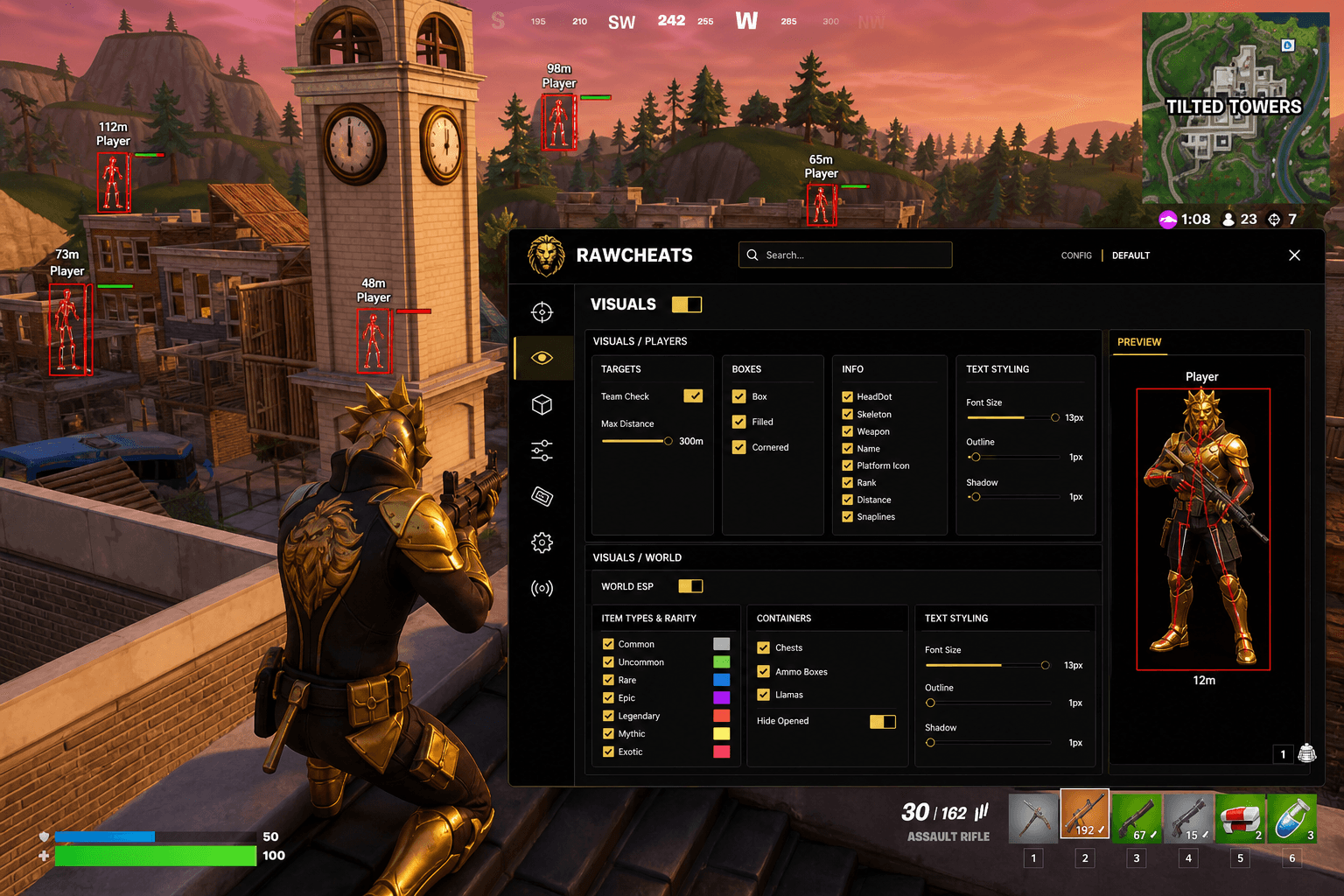
Every Fortnite ESP toggle that matters in 2026 — box styles, rarity-tiered loot, container ESP, configurable radar, snaplines, and what NOT to enable.
This post is a cluster of the Fortnite Cheats Complete 2026 Guide pillar. The pillar covered the 2026 anti-cheat landscape; this piece breaks down every ESP toggle in Raw Fortnite, what each one renders, and which combinations make sense for casual, ranked, and Cash Cup play.
If you queued a Fortnite match in May 2026 with an ESP layer enabled, you saw a screen that looks dramatically different from the same cheat in 2024. The post-Feb-2026 cheat market consolidated hard around software-only ESPs after the IOMMU mandate destroyed consumer-grade DMA overlays overnight. The cheats that survived needed to render every object class cleanly on the same screen as the game — not on a second monitor running a separate FPGA visualizer. That forced a UI redesign across every serious provider. Raw Fortnite's ESP panel is the result of that redesign, and it's split into three pages: Players, World, and Radar. Each page has per-toggle control of every object class the cheat can render. This is the working reference.
The three ESP tabs — Players, World, Radar
Raw Fortnite ships its visuals as three independent panels. Most cheat menus dump every toggle into one bloated screen; the three-tab split keeps tournament-mode and casual configs cleanly separable.
Players tab handles every enemy-related render: box style, head dot, skeleton overlay, weapon held, name label, platform icon, rank, distance text, and snaplines. Each is a discrete toggle with its own color picker. Max Distance is a 5-2000m slider that gates every render in this tab — set it tight (250m) for box-fight modes, loose (1000m+) for long-range Cash Cup builds.
World tab handles loot and containers — every weapon, every ammo box, every chest, every Llama. The toggles are organized by rarity (Common → Mythic) so you can hide the Greys and only show Rare-and-above when you're past mid-game. The "hide opened containers" sub-toggle is one of those small features that makes a real difference late game when half the chests on screen are already cracked.
Radar tab is the standalone mini-map. Size, position, zoom, max distance, and Show FOV cone are all sliders. Renders players, loot, and you on a single window you can dock anywhere on the screen.
Box styles — Box, Filled, Cornered
Three player-box styles, all with auto-coloring based on visibility:
Box — Simple rectangular outline around the enemy, 1-2px line weight. The classic ESP look. Best for low-clutter visibility when there are 30+ players still alive. Doesn't draw attention when you're recording.
Filled — Same rectangle, but the interior is partially transparent (50% alpha by default). Reads instantly even at distance. Highest readability of the three. The most common choice for casual queue.
Cornered — Just the four corner brackets, no full outline. Visually quieter than full Box but still calls out enemy position. Most readability-per-screen-space of the three.
All three styles auto-color: by default, green when the enemy is visible through line of sight, red when occluded by terrain or builds. The cue is faster than reading the box itself — you see red, you know the enemy is hiding behind a wall; you see green, the engagement is clean. This auto-color is one of the things that separates a modern ESP from a 2022-era cheat where you had to manually flip a "visibility check" toggle.
You can also stack styles — Filled + Cornered, for example, gives you the high readability of Filled with the corner accents of Cornered. Most users land on Filled alone for casual and Cornered alone for tournament play.
HeadDot, Skeleton, and the per-bone overlays
Three additional player-render layers that work alongside box styles:
HeadDot — A small filled circle (default 3px radius) centered on the enemy's head bone. Single most useful pre-aim visual because it tells you exactly where to flick. Critical for snipe-heavy Cash Cup builds; less essential for shotgun-only box fights. Color-pickable. Doesn't auto-color by visibility.
Skeleton — Renders the enemy's bone chain as a stick figure. Useful when an enemy is partially occluded — you see the arm or head sticking out of cover before the box rendering would tell you. Higher render cost than HeadDot but lower than full Box. Works at extreme distances where boxes get tiny.
Weapon — Text label showing what the enemy is currently holding. "Sovereign" / "Frenzy" / "Lever Shotgun" — exact in-game weapon names from the active loot pool. Helps with engagement decisions (do I peek a Sovereign sniper? Do I rush a Frenzy?).
Most disciplined ranked configs run Box + HeadDot + Weapon. Cornered for tournament. Skeleton stays off unless you're playing terrain-heavy maps where partial-occlusion engagements are common.
Name, platform icon, rank, distance, snaplines
The label layer. Each toggle adds one more piece of overlay text above the enemy box.
Name — Enemy display name. Useful for stream-ratting (if you're playing against a known streamer the name tells you to play their angles) but otherwise noise. Off by default in our recommended configs.
Platform Icon — Small icon showing PC, PS, Xbox, Switch, Mobile. Useful in Zero Build queues where controller players run higher aim assist; tells you whether to expect tighter aim curves. Most useful in cross-platform matchmaking.
Rank — Player's current ranked tier. Useful for prioritizing engagements — peek the Bronze, rotate from the Unreal. Less useful in casual where rank labels are noisier than helpful.
Distance — Real-time meters. Critical for sniper engagement decisions and for tuning your bullet-drop muscle memory. Pair with HeadDot.
Snaplines — A thin line from the bottom-center of your screen to each enemy. Visual radar overlay in 3D space. High screen clutter in 30+ player matches; very useful in final circles. Most users toggle this off until late game.
Loot ESP — rarity-tiered and worth more than player ESP
This is the section most player-focused guides under-cover. Loot ESP in Fortnite frequently produces more match-winning information than player ESP because positioning to the Mythic is worth more than seeing the enemy two storeys up. Raw Fortnite's World tab gives you per-rarity toggles:
- Common (grey) — Off by default. Too noisy in early game.
- Uncommon (green) — Off by default.
- Rare (blue) — On for early-mid game; off late.
- Epic (purple) — On always.
- Legendary (orange) — On always.
- Mythic (gold) — On always, with brighter color and larger render priority.
Each rarity tier has its own color picker so you can match the in-game rarity colors or override them for visibility. Most users stick with the canonical Fortnite rarity colors; if you're color-blind, override the green / orange pair with custom hex values.
The container toggles handle chests, ammo boxes, and Llamas as separate object classes:
- Chests — Standard floor chests. Toggle once per match for early-game drop optimization; toggle off late.
- Ammo Boxes — Smaller render footprint. Useful in build-fight modes where ammo runs out.
- Llamas — Always on. Loot Llamas are the highest single-source rarity dump in the game and pinning their position immediately is the highest-EV ESP play.
The hide opened containers sub-toggle drops any chest or ammo box that's already been cracked. Without it, late-game POIs end up with a forest of grey chest markers. With it, the screen stays clean and you only see the ones still worth rotating to.
The radar — most-underused feature in BR cheat menus
Raw Fortnite's radar is a full standalone mini-map, not the half-implemented afterthought most cheat menus ship. Controls:
- Size — 100-500px. Default 200px sits well in the bottom-right corner.
- Position X / Y — Drag the radar to any corner or edge. Most players dock it bottom-right or bottom-left.
- Zoom — How much of the map area is shown. Lower zoom = wider area, higher zoom = more detail. Default 1.0; set 0.5 for full-map view at the cost of player-position precision.
- Max Distance — Render gate. 2000m default. Drop to 500m if you only care about close-range awareness.
- Show FOV cone — Overlays your in-game FOV as a cone on the radar so you can see which enemies are in front of you vs behind. Critical for rotations.
Renders enemy positions as dots, loot caches as smaller dots, and your own position as a directional triangle (pointing where your character faces, not where your camera looks). For ranked / Cash Cup rotations, the radar is the highest-EV overlay in the whole cheat — more impactful than the player ESP itself, because rotation planning is where matches are won.
Animated ESP preview pane
One of the small touches that separates a finished cheat menu from a thrown-together one. The Players tab includes a live preview panel where a rotating character model renders with whatever ESP toggles you currently have enabled — Box, Filled, Cornered, HeadDot, Skeleton, etc. all visible on the preview character as you toggle them on and off.
The point: you can tune the ESP appearance before queueing. No more loading into a match, realizing your box outline is too thick, alt-tabbing to fix it, and queueing again. Adjust the line weight and colors in the preview, save the config, queue once.
What's NOT in Raw Fortnite's ESP
A few things you'll see in other vendors' marketing copy that are explicitly NOT in our product:
No health bar — Fortnite's ESPConfig explicitly omits the health field. Some cheats render HP/shield numbers above enemy boxes; Raw Fortnite doesn't. The reason is that HP rendering requires reading a specific game-state field that EAC's behavioral layer flags frequently. The trade-off (slightly worse engagement decision-making) is worth the lower detection surface.
No vehicle ESP — Vehicles aren't rendered as a separate object class. The chapter-current Fortnite map has limited vehicle use compared to chapter-3-era maps; we prioritized the engineering effort elsewhere.
No storm-wall vision / next-zone predictor — We don't expose a predictor for the next zone center. Some competitor cheats market this; it's predictable game-state math (a network packet broadcasts the next zone position to all clients before the storm moves), not a real cheat advantage. If you want to track storm timing, watch the in-game timer.
No bus list overlay — Pre-drop party name/team-count rendering isn't shipped.
These omissions are deliberate — features that add detection surface without proportionate gameplay value get cut. See the Fortnite anti-cheat cluster for why Layer 2 behavioral analysis catches feature-stack-heavy cheats first.
Recommended ESP configs per play mode
Casual / Pubs
- Box style: Filled
- HeadDot: ON
- Weapon: ON
- Distance: ON
- Snaplines: OFF
- Loot: Epic + Legendary + Mythic
- Chests + Ammo Boxes: ON, hide opened
- Llamas: ON
- Radar: 200px bottom-right, zoom 1.0, FOV cone ON
Ranked
- Box style: Filled or Cornered
- HeadDot: ON
- Weapon: ON
- Distance: ON
- Rank: ON
- Snaplines: OFF (toggle on final circles)
- Loot: Rare + Epic + Legendary + Mythic
- All container toggles ON
- Radar: 250px bottom-right, zoom 0.7, FOV cone ON
Tournament / Cash Cup
- Box style: Cornered only (lowest visual signature)
- HeadDot: ON
- Weapon: OFF
- Distance: ON
- Rank: OFF
- Snaplines: OFF
- Loot: Mythic only
- Containers: Llamas only
- Radar: 200px, zoom 0.5, FOV cone ON
Save each as a config slot (Settings → Configs → Save) so you can swap presets between play modes.
Frequently asked questions
Does Raw Fortnite have a health bar above enemies? No. Fortnite ESP explicitly omits health/shield rendering. The reason is that reading the specific HP field adds detection surface that Epic's Layer 2 behavioral analysis flags frequently. We accept slightly worse engagement decisions in exchange for the lower risk surface.
Can I show vehicle locations? No. Vehicles aren't rendered as a separate ESP class in Raw Fortnite. The current chapter map has limited vehicle pressure compared to chapter 3, so we prioritized engineering effort on player + loot + radar.
What's the difference between Skeleton and HeadDot? HeadDot is a single circle on the enemy's head bone — useful as a pre-aim target. Skeleton renders the entire bone chain (head, spine, arms, legs) as a stick figure — useful when an enemy is partially behind cover and you want to see the limb sticking out. They're complementary; many users run both at long range and only HeadDot in close-range box fights.
Do the rarity colors auto-update if Epic adds a new rarity? Yes — the rarity tags are read from the live game-state, not hardcoded. If Epic adds a "Transcendent" tier (or similar) in a future chapter, it picks up the rarity tag automatically and uses your override color for that tier.
Is the radar visible to OBS / Fortnite replay recording? No. Raw Fortnite's overlay layer is stream-proof — it renders separately from the game's swap chain capture, so OBS, Fortnite's native replay system, and game-capture sharing all see the un-cheated frame. This is also covered in the setting up Fortnite cheats safely cluster, where we walk through the OBS verification step.
Should I run snaplines or not? Off for most play modes. The screen clutter in mid-game matches outweighs the awareness benefit. Toggle on only in final-circle endgame scenarios where you specifically need to track 5-10 remaining players' positions in real time.
What's the right Max Distance for ranked play? 500-800m for most ranked Reload Build queues. Set lower (250m) for Zero Build where engagements are closer; set higher (1500m+) only for long-range Cash Cup snipe-heavy lobbies. Tighter Max Distance reduces visual clutter and makes box fights cleaner.
Ready to load Raw Fortnite with a fully-tuned ESP profile? Get Raw Fortnite from $4.99 and import the casual / ranked / tournament configs above as starting points. Pair with Raw Spoofer before every session — mandatory in 2026. Live cheat status: Fortnite Cheat Status. For the deep aimbot reference, see Fortnite aimbot settings 2026.
