
PUBG ESP — 12-Toggle World Filter with Brutalist Item Search
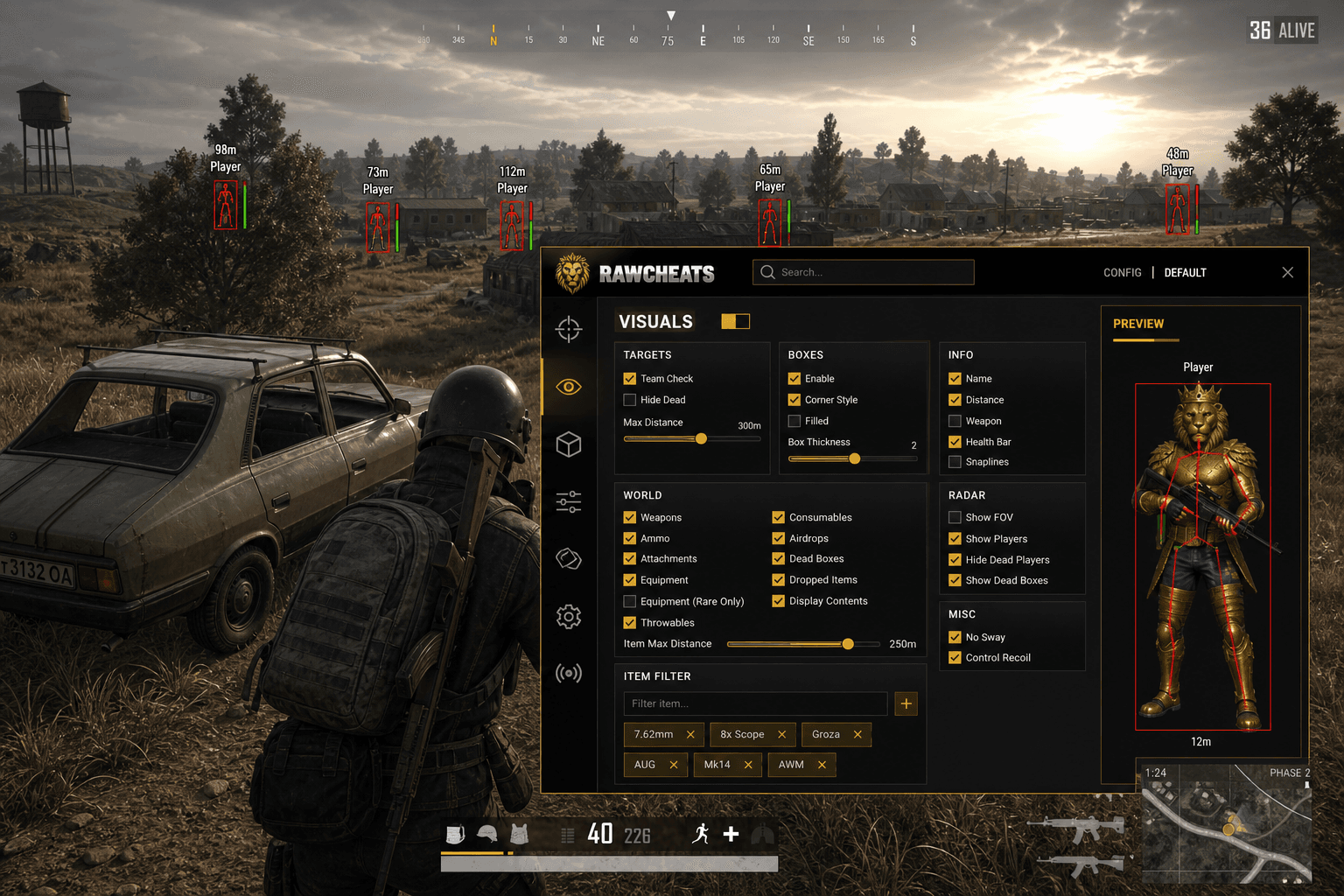
PUBG ESP for 8x8km maps. 12 world toggles for loot, item-name filter card, max-distance slider, visibility-based coloring at 1000m+.
PUBG's loot economy is the deepest in any battle royale. Three pistols, five SMGs, eight ARs, four DMRs, four sniper rifles, four shotguns, three throwable categories, six consumable types, six attachment slots per weapon, three armor tiers, two helmet tiers, a half-dozen backpack tiers, plus a special-circle airdrop economy. Multiply by an 8x8km map and a 100-player lobby, and the average match has more pickupable items than the average MMO town. A 2024-era PUBG wallhack that draws a single "loot" overlay class on top of all of that is unreadable noise. You need filter granularity — 12 separate ESP categories, per-item rarity gating, max-distance slider, and a text-based filter card that lets you whitelist specific item names. That's what we ship in Raw PUBG, and why.
This post is a cluster of the PUBG Cheats Complete 2026 Guide pillar. The pillar covered the anti-cheat stack and aimbot side at a high level. This piece is the deep reference for the Visuals tab — Player ESP, World ESP, Radar — and the design decisions behind 12-toggle granularity.
Why PUBG ESP design differs from CQB shooters
A CS2 wallhack draws four player boxes through the wall and you're done. PUBG's map is fundamentally different. At 600m, an enemy player is maybe two pixels of screen real estate; an ammo box on the ground is one pixel. Without distance-aware rendering and per-category visibility control, ESP becomes a wall of overlapping text labels obscuring everything you actually want to see.
The design constraints PUBG ESP has to solve:
- Distance scaling. Players at 1000m need legible labels; players at 5m need labels that aren't filling your entire screen.
- Per-category visibility. A scoped engagement at 400m wants weapons + armor visible. A late-game push wants throwables and consumables visible. A loot-route plan wants attachments and equipment-rare-only visible. You can't show all of these simultaneously without becoming useless.
- Item filtering. When you're looking for a Level 3 Helmet specifically, you don't want every Energy Drink and Painkiller on the map distracting you.
- Visibility-based coloring. Knowing if the target can see you matters more in PUBG than in any other shooter — it's the difference between "shoot now" and "rotate flank."
Raw PUBG's Visuals tab is built around these constraints. The structure: three accordion sections (Players, World, Radar) on a single Visuals tab, each with its own toggle stack.
Player ESP — the standard but tuned for long-range
The Players accordion has three sub-groups: TARGETS, BOXES, INFO. Each sub-group has multiple toggles.
TARGETS — what counts as an enemy and what gets drawn:
- Enable Player ESP (master toggle)
- Show Visible (visibility-based coloring on / off)
- Show Occluded (toggles drawing of behind-cover enemies)
- Team Filter (squads only / enemies only / all)
- Max Distance (slider, default 1000m, max 2000m)
BOXES — the visual shape:
- Box style: Box / Filled / Cornered (multi-style box ESP — visibility-based auto-coloring on all three styles)
- Skeleton (bone lines for player pose visualization)
- Snaplines (line from your character to enemy — useful for radar-mode awareness, distracting in scoped fights)
INFO — text labels:
- Name (player name above the box)
- Distance (meters, with thousands separator at >1km)
- Weapon Held (current weapon name)
- Health Bar (HP color gradient)
- Health Number (numeric HP value alongside the bar)
The combination of three styles + visibility coloring is the differentiating UX. Most PUBG cheats ship single-style box ESP. The Box / Filled / Cornered choice matters because visual clarity changes with engagement type — Cornered is least obtrusive for scoped engagements, Filled is best for tracking moving targets in CQB.
World ESP — 12 toggles plus the Brutalist Item Filter card
This is the section that justifies the entire Visuals UX overhaul. PUBG's loot economy demands granular control over what gets drawn on the map. The 12 toggles live in the World sub-accordion:
- Weapons — all firearms on the ground (color-coded by tier).
- Ammo — ammunition stacks (5.56, 7.62, 9mm, .45, .300 Magnum, shotgun shells, sniper rounds).
- Attachments — sights, grips, muzzle attachments, stocks, magazines.
- Equipment — vests, helmets, backpacks.
- Equipment Rare Only — restricts the Equipment toggle to Level 3 only. Useful when you've got Level 2 already and want to scout upgrades.
- Throwables — frags, smokes, stun grenades, molotov cocktails, sticky bombs (if mode).
- Consumables — meds (bandages, first aid kits, med kits), energy drinks, painkillers, adrenaline syringes.
- Airdrops — care packages (active drops + already-opened crates).
- Dead Boxes — death crates from killed players. Useful for tracking which players have already died in your area.
- Dropped Items — items dropped by players (vs spawn items). Different signal entirely.
- Display Contents — toggle that expands airdrops / dead boxes to show what's inside them.
- Item Max Distance — slider that caps World ESP at a distance independent of Player ESP max distance.
The combination produces an ESP overlay you can actually read. Want to see weapons + airdrops only? Toggle the other ten off. Want to plan a loot route in early game? Turn on weapons, attachments, equipment-rare-only. Mid-game scouting for throwables before a final-circle push? Enable throwables + consumables.
The Brutalist Item Filter card
Below the 12 toggles sits the differentiating component — a Brutalist-styled filter card with three elements:
Text input field. Type the name of any item ("AKM", "8x", "Level 3 Helmet", "Frag Grenade"). The filter matches partial strings, so "AK" matches AKM, AKS-74U, etc.
Gold "+" add pill. Click to commit the typed string to the whitelist. The pill flashes gold to confirm.
Chip-flow tag display. Each whitelisted item appears as a chip with the item name and an "x" remover. Click the x to remove. Chips wrap to multiple rows as you add more.
When the filter is active, the World ESP draws only items matching whitelisted names (regardless of which of the 12 category toggles are on). When the filter is empty, the 12 toggles control visibility normally. The filter is additive — turning on Weapons + filtering for "AKM" shows only AKMs, not all weapons.
The use case: scouting specific high-tier items. You're going for the AWM. Filter "AWM", "8x", "Level 3 Helmet", "Backpack Level 3", "Suppressor Sniper." Toggle off everything else. The ESP overlay becomes a clean treasure-hunt map.
Radar — top-down minimap with PUBG-specific toggles
The Radar accordion is the simplest of the three but the most useful for late-game zones. Configurable corners (top-right is the default position alongside the in-game minimap), size slider, position offsets, zoom slider.
The four toggles:
- show_fov — draws your character's facing angle as a cone on the radar. Helps with "am I going to push or rotate?" decisions.
- show_players — toggles enemy dots on the radar. Default on.
- hide_dead_players — removes dots for already-killed players (default off, but useful in late game when you want to track only live threats).
- show_dead_boxes — toggles dead-box markers, useful for "did anyone die in this compound recently?" decisions.
The radar doesn't ship vehicle velocity vectors, squad-grouping lines, or care-package countdown timers — features competitors sometimes advertise that don't actually exist in our product or theirs (most of the time). What ships is what's useful at the design constraint: late-game positional awareness without screen clutter.
What we don't ship in PUBG ESP
Honesty checkpoint — features you might see in competitor marketing that aren't in Raw PUBG:
- Bluezone preview — Not in product. PUBG's zone-generation algorithm has been reverse-engineered partially, but anything we'd ship as a "next zone predictor" is either statistical guessing or a feature that gets killed by Krafton fast. Not worth the surface area.
- Squad-grouping lines — Drawing connecting lines between squadmates of an enemy team isn't shipped. Possible to implement but produces visual noise that hurts more than it helps.
- Vehicle velocity vectors — Not in product. We draw player ESP on vehicle drivers; the velocity vector layer isn't shipped.
- Care package countdown timers — Airdrop ETA estimators aren't in the product. The toggle shows active drops; we don't predict when the next one arrives.
If a vendor's marketing claims any of the above, ask for a recent screenshot. Most of the time it's a feature description that didn't ship or that got removed.
Visibility-based coloring — the under-rated feature
Multi-style box ESP (Box / Filled / Cornered) with visibility-based auto-coloring is the spec we run at. Visibility coloring means a different color set draws when an enemy can see you vs when they can't. Standard mapping:
- Enemy visible to you AND can see you back: red.
- Enemy visible to you but cannot see you (you're flanking): yellow / orange.
- Enemy not visible to you (you can't shoot them anyway): cyan / blue, drawn only if the Show Occluded toggle is on.
The reason this matters at 600m: knowing if the target has line of sight on you is the difference between "shoot now and reposition" and "they have no idea you're here, take three shots." Most PUBG cheats either don't ship this or implement it incorrectly (coloring based on raycasts from your camera, not from the enemy's eyes). The implementation matters.
Performance impact
PUBG's 100-player lobbies plus the world-item count makes ESP performance a real consideration. Raw PUBG's ESP renderer is GPU-accelerated where possible and ships frame-time impact in the 0.3-0.7ms range on modern hardware (RTX 30/40 series, RX 6000/7000 series). The Item Max Distance slider is the biggest performance lever — pushing it from 500m to 2000m roughly triples the entity count you're drawing.
Recommended: 1000m Player ESP max distance, 500-800m Item ESP max distance for the average match. Push Item ESP higher only when you specifically need it (loot-route planning in early game).
FAQ
How many ESP toggles does Raw PUBG ship? Player ESP has 5 TARGETS + 3 BOXES + 5 INFO = 13 toggles. World ESP has 12 dedicated category toggles plus the item filter card. Radar has 4 toggles. Total: 29 individual ESP controls.
Does the item filter support partial matches? Yes. Typing "Helmet" matches Level 1 Helmet, Level 2 Helmet, Level 3 Helmet. Typing "AK" matches AKM and AKS-74U. Useful for category-bulk filtering vs precise item naming.
Why is visibility-based coloring on by default? Because at 600m+ engagement distance, knowing line-of-sight reciprocity is critical decision-making information. Without it, the ESP is informationally incomplete.
Can I save ESP presets? Yes — per-user config slots store the full Visuals state. Save a "early-game loot route" preset, an "mid-game scouting" preset, a "late-game push" preset, hotkey-swap.
Does ESP work in first-person mode? Yes. ESP renders on top of the game camera regardless of TPP / FPP mode. The render pipeline is camera-agnostic.
What's the max distance ESP can render at? 2000m on Player ESP, 2000m on Item ESP. Beyond that the render distance hits PUBG's own object-culling and the entities aren't streamed to your client anyway.
Does the radar show vehicles? Player ESP draws enemies in vehicles (the player, not the vehicle). The radar shows player dots; we don't draw vehicle silhouettes separately. Vehicle ESP as a distinct feature isn't shipped.
Pair with the right aim setup
ESP without correctly-tuned aim is half the cheat. The PUBG aimbot settings cluster covers the bone priority, FOV cone, smoothness, and visibility-only configuration that pairs with the ESP layer above. For the anti-cheat context that explains why these features work, How PUBG anti-cheat works.
Raw PUBG ships every ESP feature described in this post. Full pillar context at PUBG Cheats Complete 2026 Guide. Status updates at PUBG cheat status.
