
Arc Raiders ESP — ARC Robots, Extraction Overlay, and Rarity-Filtered Loot
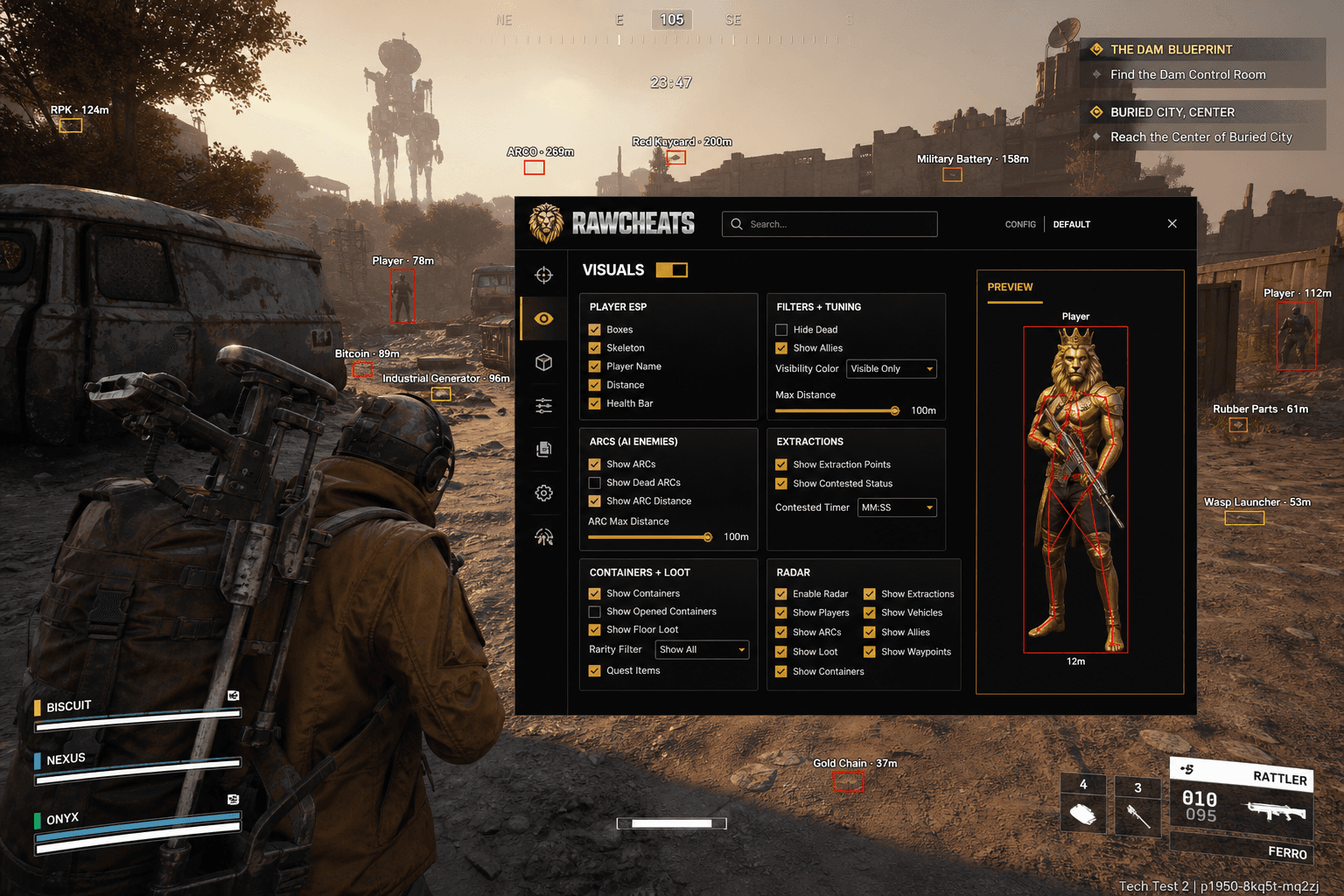
The genre-unique features that make Arc Raiders ESP different from any other extraction shooter — ARC threat-tier visualization, extraction contested-status timer, rarity-filtered loot.
The single highest-utility cheat feature in Arc Raiders isn't aimbot. It's the extraction-point contested-status overlay — knowing which extracts are clean and which have hostile players camping the timer changes raid routing in a way no aimbot does. This is the extraction-shooter dynamic that Tarkov players have understood for years: the genre's deciding factor is information, not aim. Arc Raiders' ESP surface is intentionally narrower than our Fortnite or Marvel Rivals products — there are simply fewer object classes in the game — but the features that ship are the ones that matter for the genre's actual game loop. Most cheat-provider blogs market Arc Raiders ESP as "player ESP" and stop there, missing the three features that actually win raids: ARC robot threat visualization, extraction overlay, and rarity-filtered loot ESP.
This post is a cluster of the Arc Raiders Cheats Complete 2026 Guide pillar. The pillar covers the policy and market context; this is the deep reference for the Visuals tab in Raw Arc Raiders.
Player ESP — the bones that matter, the styles that don't
Raw Arc Raiders' Player ESP surface is deliberately smaller than the Player ESP in our other products. The differences are worth understanding before you go looking for features that aren't there:
Boxes are a single checkbox toggle. There's no Box / Filled / Cornered dropdown like Raw Fortnite ships. The reason is that Arc Raiders' player-model proportions and the game's lighting don't make box-style variation visually meaningful — a Cornered box on Arc Raiders character models reads the same as a regular box because the model occlusion patterns are different. Single toggle, on or off.
Skeleton renders the character bone structure overlaid on visible enemies. Useful for tracking peek motion and pose state in close-range engagements. Toggle.
Player Name displays the player's display name above the model. Useful for identifying recurring contested-extract opponents and for spotting friends in chaotic raids.
Distance displays the meter-distance from your position to the target. Critical for ranged engagement decision-making (sniper engagements at 100m+ play very differently from 30m AR exchanges).
Health Bar displays the target's current HP. Most useful for deciding whether to push or reset on a damaged opponent. The Health Bar accuracy depends on the game state your client has — sometimes it lags by a hit or two — but it's accurate enough for engagement decisions.
Color is hardcoded. This is the key difference from other RawCheats products. There are no user color pickers in Arc Raiders' Player ESP. The color is determined by visibility: green = enemy is visible to you (you have LOS), red = enemy is occluded (behind cover, terrain, or builds). This is intentional and not configurable. The reason is that the auto-coloring is the most efficient visibility signal — instead of running a separate "visibility check" overlay, every ESP element communicates visibility through its color. Switching colors mid-fight signals occlusion changes immediately.
No Chams. Chams (full-model recoloring through walls) are not in Raw Arc Raiders. The combination of box + skeleton + auto-color visibility logic covers the same information surface without the additional render overhead. Chams would also be more detectable on Arc Raiders' rendering pipeline than on the games where we do ship them.
No Snaplines. Snap lines from your character to enemies are not in Raw Arc Raiders. The same information is communicated through Box + Name + Distance at lower render cost. Snaplines also produce visual clutter in third-person view that doesn't help engagement decisions.
Filters and tuning
Three toggles that change which players the ESP considers:
Hide Dead. Toggle. When ON, the ESP doesn't render dead players' models (otherwise you'd see corpse outlines, which clutter the view). Default ON.
Show Allies. Toggle. When OFF, your squadmates don't get ESP overlays. Default OFF for solo/duo, ON for squads because team awareness is part of the game.
Visibility Color — confirms the green-visible / red-occluded color logic is active. There's no slider for this; it's binary on or off.
Max Distance slider (100m). Caps the ESP render distance. Default 100m matches the game's effective engagement range; longer slider values produce more visual clutter without improving raid outcomes because engagements beyond 100m are rare and usually sniper-only.
ARC robot ESP — the genre-unique feature
ARCs are the PvE robotic enemies that populate every raid. There are five known types — Bombardier, Wasp, Rocketeer, Leaper, Hornet — each with different threat profiles, attack patterns, and loot drops. Knowing where ARCs are positioned changes raid routing in a way that's structurally different from how player ESP works.
Raw Arc Raiders' ARC ESP surface:
Show ARCs — single toggle, gold default. When ON, all five ARC types render with the standard ESP overlay (box, name, distance, health bar based on what you've enabled). The toggle covers all five robot types — there's no per-type subdivision in the menu. A user request we get occasionally is "can you split out Rocketeers from Bombardiers" — the answer is no, because the visibility-based color logic already communicates threat tier through the green/red coloring without per-type menu UI.
Show Dead ARCs — toggle. When ON, killed ARC models stay rendered (useful for loot pickup confirmation). When OFF, they disappear from ESP after death. Default OFF for active raids.
Show ARC Distance — toggle for the distance display on ARC overlays.
ARC Max Distance slider — like the player ESP distance cap, but for ARCs specifically. Useful for filtering out the swarm of distant Bombardiers in heavy raid areas. Default 80m.
Color is hardcoded by visibility. Same logic as player ESP — green when you have line-of-sight, red when occluded. This is the implicit threat-tier visualization: a Rocketeer at 150m flagged red (occluded) is a different situation from a Wasp at 30m flagged green (visible and engaging). The hardcoded coloring handles the threat-tier read without per-robot-type menu controls.
The competitor pattern of "ARC ESP with per-type colors" is a feature that sounds good in marketing but doesn't improve raid outcomes — what you actually need is the visibility signal, not the type-classification signal (which you can read from the model render itself).
Extraction overlay — the highest-utility non-aim feature
Arc Raiders' core game loop is the contested extract. You raid Speranza or the Rust Belt, you accumulate loot, then you have to reach an extraction point and survive long enough for the extract timer to complete. If a hostile player or squad is camping the extract, you either fight them or rotate to a different one. Knowing extract status before you commit to the rotation is the single biggest information advantage available in the game.
Raw Arc Raiders' Extractions ESP surface:
Show Extraction Points — toggle. When ON, all extract markers render on-screen with their position, distance from you, and current contested-status state.
Contested-status timer. This is the genre-unique feature. Extracts in Arc Raiders have multiple states: clean (no players nearby), contested (players within proximity), active (someone is using the extract right now), or completed. The ESP overlay surfaces all four states, plus the timer countdown when an extract is being used. This is information you'd otherwise have to commit to the rotation to discover — making the wrong commitment costs you a raid.
Color logic follows the visibility model — clean extracts read differently from contested extracts at a glance.
The competitor pattern of "extraction markers" without contested-status timing is shipping you half the feature. The status timer is what makes the extraction overlay useful for routing decisions.
Container and loot ESP — rarity filter changes the math
Arc Raiders has a multi-tier rarity system (Common, Uncommon, Rare, Epic, Legendary, Prototype). Most of your raid is spent looking at piles of low-tier loot that aren't worth the time to inventory-manage. The rarity filter is what makes loot ESP actually useful instead of just visually noisy.
Show Containers — toggle. Renders ESP markers on every container in your detection range (lockers, supply crates, vehicle trunks, etc).
Show Opened Containers filter — toggle. When ON, containers that have been opened (looted out) get filtered out of the ESP. Default ON for active raids because opened containers are dead weight visually.
Show Floor Loot — toggle for items lying on the ground (dropped by killed players, ARC drops, scattered raid loot).
Rarity Filter — multi-select for which rarity tiers to render. Default config: Epic, Legendary, Prototype. Lower tiers off because they clutter the view without changing routing decisions. For high-value raids (juiced raids, contested zones) drop the filter to Legendary + Prototype only — anything else isn't worth a fight over.
Quest Items highlight — toggle. Items that match your current active assignments get a distinct highlight. Critical for efficient quest completion because the quest item is what you actually need; everything else is filler.
The combination of rarity filter + quest item highlight is what makes loot ESP useful for the actual game loop. Without filtering, you'd be visually overwhelmed by Common-tier ammunition piles. With filtering, you see only what's worth changing your route for.
Radar — fusing every overlay into a single map
The top-down minimap overlay. Eight toggles that control which entity classes show on the radar:
Players, ARCs, Containers, Floor Loot, Extractions, Quest Items, Vehicles, Resource Nodes — each independently toggleable. Default config: Players ON, ARCs ON, Extractions ON, Quest Items ON, everything else off (the radar gets too busy with everything enabled).
Radar size, position, zoom — fully configurable. Standard placement is bottom-right corner, medium zoom level (100m radius).
Radar is one of the highest-utility overlays in extraction-shooter cheating because the genre's deciding mechanic — knowing whether to push, peel, or extract — depends on full-map awareness. The single radar view fuses information you'd otherwise have to scan four ESP layers to assemble.
What's NOT in Raw Arc Raiders' ESP (and why)
Worth being explicit about, because competitor marketing often claims features we don't ship:
- No Chams — covered above. Box + skeleton + auto-color visibility covers the same information surface.
- No Snaplines — covered above. Box + name + distance communicates the same data without the visual clutter.
- No Box Style dropdown — single toggle for boxes, not Box/Filled/Cornered like Fortnite. Arc Raiders' model proportions don't make style variation visually meaningful.
- No user color pickers — the hardcoded green-visible / red-occluded color logic is more useful than configurable colors because it communicates visibility automatically.
- No per-ARC-type subdivision — single ARCs toggle covers all five robot types. The visibility-based coloring handles threat-tier read without per-type menu controls.
- No Ultimate Tracker — Arc Raiders doesn't have heroes-with-ultimates the way Marvel Rivals or Overwatch do. Not applicable to the genre.
If you see a competitor pitching one of these features as their differentiator, they're either misrepresenting the game's actual feature surface or shipping ports from other games that don't match Arc Raiders' UX. The features we ship are the ones the game's mechanics actually call for.
Conservative ESP profile per play type
Casual / solo PvE config
- Player ESP: Box + Name + Distance (skeleton off, health bar off for less visual clutter)
- ARCs: Show ARCs ON, Distance ON, Max Distance 80m
- Extractions: Show Extraction Points ON
- Loot: Rarity filter set to Rare + Epic + Legendary + Prototype, Quest Items ON
- Radar: Players + ARCs + Extractions + Quest Items, no other classes
Standard raid config
- Player ESP: Box + Skeleton + Name + Distance + Health Bar (full quartet)
- Filters: Hide Dead ON, Show Allies OFF (solo) or ON (squads), Max Distance 100m
- ARCs: Show ARCs ON, Distance ON, Max Distance 80m
- Extractions: Show Extraction Points ON (mandatory)
- Loot: Rarity filter Epic + Legendary + Prototype, Quest Items ON
- Radar: All eight toggles ON for full battlefield awareness
High-stakes juiced raid config
- Player ESP: Full quartet (Box + Skeleton + Name + Distance + Health Bar)
- Filters: Hide Dead ON, Show Allies as appropriate, Max Distance 100m
- ARCs: Show ARCs ON for awareness but Max Distance dropped to 60m (focus on close threats)
- Extractions: ON, watching contested-status timer carefully
- Loot: Rarity filter Legendary + Prototype only (anything else isn't worth a fight)
- Radar: Players + ARCs + Extractions only (cut clutter, focus on threats)
Frequently asked questions
Why isn't there a Chams option? Box + skeleton + auto-color visibility covers the same information surface at lower render overhead and lower detection surface. Chams would be a marginal information add for non-marginal render cost. The Arc Raiders ESP feature set is intentionally tuned for the game's actual information needs.
Can I change the visibility colors from green/red to something else? No. The auto-coloring is hardcoded. The green-visible / red-occluded logic is the most efficient visibility signal we can ship; user color picking would let people set both states to the same color, which defeats the purpose. If you want different colors, you can adjust your monitor's settings, but the menu doesn't expose color pickers.
Is the extraction contested-status timer accurate? Yes, within the client-side game state. The state updates are based on the same telemetry the game uses for its own extraction UI; our overlay reads from the same source. There's a brief sync lag of <500ms in most cases, which doesn't materially affect routing decisions.
Does the rarity filter work in real-time as I move? Yes. The filter operates on rendered items, so as you move into and out of detection range of new containers / floor loot, the filter applies live. Items below your selected rarity tier don't render at all, items above the tier do.
What's the Max Distance slider's effective cap? The slider goes to 100m. Beyond 100m the game's own state-streaming starts dropping detail, so rendering ESP for distant items produces increasingly unreliable data. We cap at 100m because it matches the game's effective engagement range and reliable data range.
Can I see what an extract's exact remaining time is before I push? Yes — when an extract is being used, the overlay surfaces the timer countdown in seconds. You can use this to decide whether to interrupt the extract (if you can reach it before the timer completes) or rotate to a different one.
Do quest items highlight only my quests or every player's quests? Only yours — the overlay reads your active assignment list and matches item IDs. Other players' quest items don't highlight on your view. Each player sees their own quest highlights.
Does the radar show ARC threat-tier? The radar uses the same hardcoded visibility coloring as the ESP overlay — green when visible, red when occluded. There's no per-ARC-type color, just the visibility-based read. The combination of position on the radar + visibility color is enough to make routing decisions without per-type subdivision.
Ready to play Arc Raiders with the actual genre-defining features? Raw Arc Raiders ships the full Visuals tab — extraction overlay, ARC ESP, rarity-filtered loot, radar. Pair with Raw Spoofer for cross-EAC HWID protection. For the broader context, see the pillar and the aimbot tuning cluster.
