
Overwatch ESP — Ultimate Tracker, Live Game Team Roster, Outlines
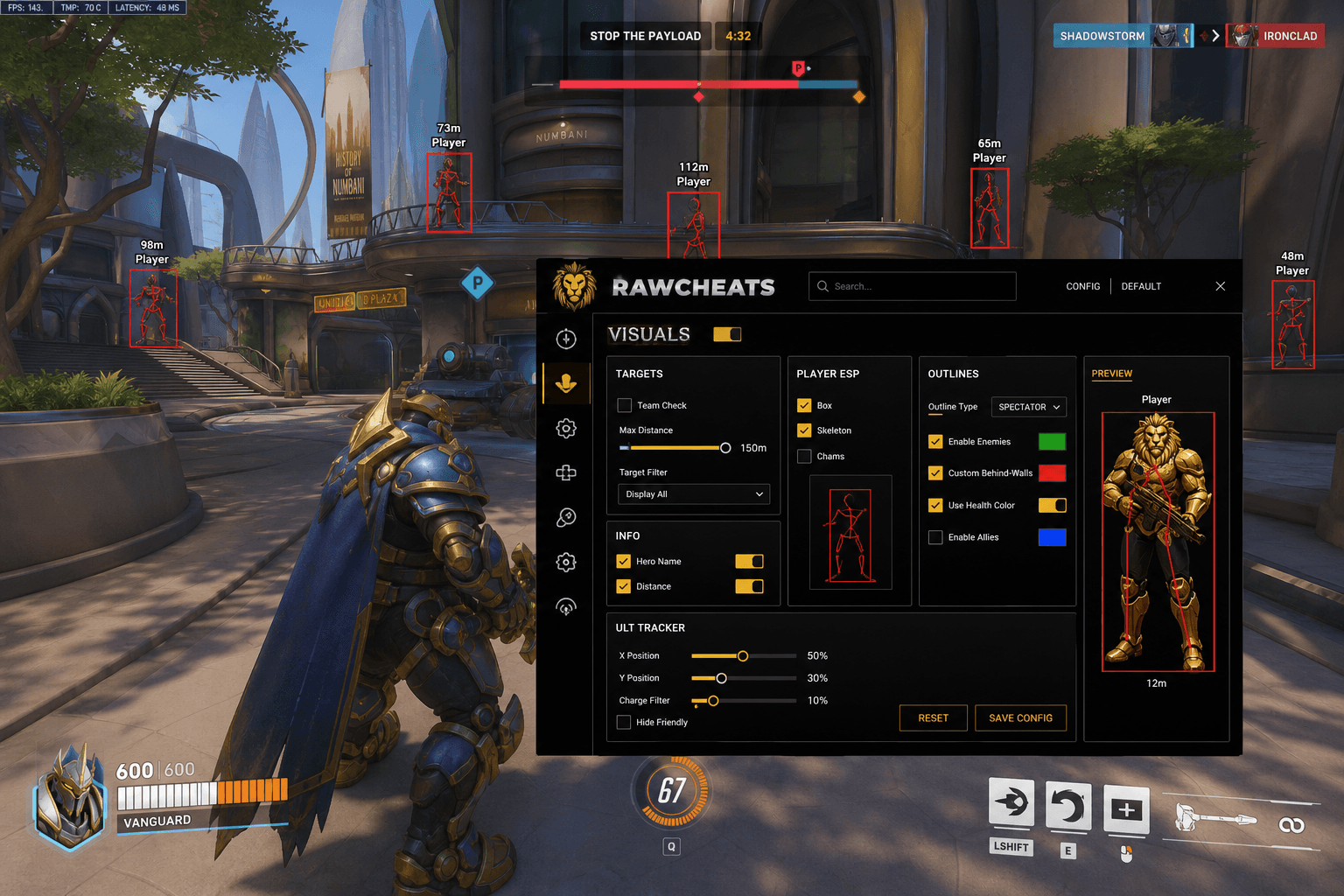
Why ult charge readout is the hero-shooter-defining ESP feature. The Live Game team roster with battletags and ult bars. Full Outlines wallhack treatment.
This post is a cluster of the Overwatch Cheats Complete 2026 Guide pillar. The pillar covered the broader feature set; this piece goes deep on the visual layer — ESP, the Live Game team roster, the Ultimate Tracker, and the Outlines wallhack system.
If you have used a Fortnite cheat or a PUBG cheat, the ESP feature surface there is mostly box ESP plus chams plus distance readouts. Overwatch's ESP looks similar at first glance but has two genre-defining additions that nothing else on the market needs: the Ultimate Tracker and the Live Game team roster. Both leverage information that is unique to hero shooters — every enemy is one of ~40 heroes, every hero has a charging ultimate, every enemy has a battletag visible in the scoreboard. Reading and displaying that information cleanly is the entire visual-layer engineering challenge for an Overwatch cheat.
The Visuals Tab Structure
Raw Overwatch ships a Visuals tab with several distinct card sections. Each section is independently configurable and previews live in the sidebar before you queue.
Targets — Master toggle for the visual layer. Enables / disables the ESP renderer.
Player ESP — Box, Skeleton, Chams toggles. Color swatches for friendly / enemy / visible / occluded states. Preview sidecar renders the player model with your current toggles applied so you can see exactly what your view will look like in-game before queueing.
Info — Hero Name and Distance toggles. Renders a label above each player showing their selected hero (e.g., "Widowmaker") and distance in meters. This is the genre-essential information: knowing the enemy is Widow at 35m tells you more than knowing there's a player at 35m.
Outlines — The wallhack feature, configured at the outline level. Covered in depth below.
Ult Tracker — Dedicated card with X/Y position sliders, Charge Filter percent slider, Hide Friendly toggle. Covered below.
Outlines — The Wallhack Treatment
The Outlines section is where Overwatch's ESP architecture diverges from other cheats. Instead of separate "Wallhack" and "ESP" toggles, the visibility-through-walls feature is implemented as a color-coded outline system with the following controls:
Outline Type — Dropdown with multiple rendering styles. The default option is labeled SPECTATOR — the outline style used by Overwatch's own spectator and replay system, which makes the visual appearance familiar and naturally blends with the game's visual language. Alternative styles are available but SPECTATOR is the most defensible-looking.
Enable Enemies — Toggle with color swatch (default green). Renders an outline around every enemy in line of sight.
Custom Behind-Walls — Toggle with color swatch (default red). Renders a distinct-colored outline around enemies that are occluded — through walls, behind buildings, around corners. This is the wallhack-equivalent feature, but the implementation as a colored outline rather than a glowing box has a meaningful operational difference: outlines blend with the game's existing visual palette while a glowing red box screams "wallhack" in any screenshot.
Use Health Color — Toggle. When enabled, the outline color shifts based on the enemy's current HP percentage (green at full HP, yellow at 50%, red at <25%). Provides instant target prioritization information — a 10% Tracer behind a wall is a higher-value engagement than a 100% Reinhardt.
Enable Allies — Toggle with color swatch (default blue). Renders ally outlines. Most users leave this off — the game's existing team-color UI handles ally awareness adequately.
The Outlines system replaces what a 2022-era cheat would call "Wallhack" with a configurable feature surface that integrates with the game's visual language. The Custom Behind-Walls outline is the wallhack functionality; the visual treatment differs.
The Ultimate Tracker — Hero-Shooter Genre-Defining
The Ult Tracker card is the feature that makes hero shooters worth cheating at compared to traditional FPS games. Every Overwatch hero has an ultimate ability that charges through combat — getting damage, getting kills, taking damage, healing teammates. The ultimate fires only when fully charged. Knowing exactly when an enemy's ultimate will be ready transforms team-fight engagement decisions.
In a vanilla match, you can guess enemy ult charge from how aggressively they have been engaging — a Reaper farming kills is probably close to ult, a Mercy who hasn't been the focal point probably isn't. The Ult Tracker replaces guessing with reading.
X/Y Position Sliders — Drag-and-drop control over where the ult-charge HUD renders on screen. Most users dock it in a corner where it does not occlude the central engagement area. The slider precision is per-pixel so the HUD position survives different monitor configurations and aspect ratios.
Charge Filter Percent Slider — Filters the displayed ultimates by charge percentage. Set the filter to 80% and the HUD only shows enemies whose ult is 80%+ charged — the engagement-critical information. Setting the filter to 0% shows every enemy's charge percentage. Setting to 100% shows only fully charged ults (the most actionable threshold).
Hide Friendly Toggle — Renders only enemy team ult charges, hides your own team. Most users prefer this because friendly ult charges are visible in the standard team-color UI anyway; the cheat adds value by showing the information you do not normally have.
The Ult Tracker is what makes a 4v4 team fight playable with information advantage. Knowing the enemy Reinhardt is at 95% ult charge changes whether you commit to a flank or rotate to your own ult-ready DPS. The genre-essential information is exactly what the cheat surfaces.
The Live Game Tab — Team Roster With Battletags
The Live Game tab is the sidebar tab unique to Overwatch in our cheat lineup. None of our other products (Fortnite, Rust, PUBG, Marvel Rivals, Arc Raiders) have the equivalent because no other game we cover has both fixed team rosters and persistent player identities the way Overwatch does.
The Live Game tab renders a 2-column team roster — friendly team on one column, enemy team on the other — with the following information per player:
- Battletag — The player's BattleNet identifier (e.g., "RawCheatsLuna#1337"). Visible in the scoreboard in-game but only when you tab — the Live Game tab keeps it persistently visible.
- Hero portrait — The hero icon for the player's current pick. Updates live when they hero-swap mid-match.
- Ultimate charge bar — A per-player progress bar showing their current ult charge percentage. Updated live throughout the match.
What this enables: pre-fight context. Knowing the enemy DPS is "ChessGOTpunished#2381" who you played against three games ago, who tends to hold position aggressively on second point, who you noticed last game over-commits when down a teammate — that knowledge is normally locked behind the scoreboard tab. The Live Game roster keeps it visible. Same advantage as remembering a sports opponent's tendencies between matches, just made instant.
The 2-column layout reflects Overwatch's fixed 5v5 team structure (post-2022 transition from 6v6) and the per-player ult bar gives the same information as the Ult Tracker but at the team-roster scale.
Per-Visual Feature Tuning Recommendations
Box ESP on or off? Most disciplined users run box ESP off and rely on the Outlines feature for through-wall awareness. Box ESP looks more obviously like a cheat in screenshots; outlines look like the game's spectator UI.
Chams on or off? Off for ranked / tournament. Chams (re-rendering player models in solid colors) are a strong visual signal in screenshots. Outlines are sufficient for tracking enemies through cover.
Hero Name labels on or off? On. The information value is high (knowing it's Widow vs Hanzo at 30m matters), and the visual footprint is small.
Distance labels on or off? On for projectile heroes (lead distance matters for Hanzo / Pharah), can be off for hitscan heroes if you want a cleaner HUD.
Ult Tracker filter percentage? 60-80% is the working range. Below 60% the HUD is too crowded; above 80% you miss the medium-charge enemies who are close to ult and rotating toward team fights.
Outline colors? Default green / red (visible enemies / behind-walls enemies). Some users prefer green / yellow for a subtler through-wall indicator. Match your color palette to the game's existing UI for visual cohesion.
Live Game tab open or closed? Open during competitive matches, closed for casual. The information overhead during pubs is more distracting than useful; in ranked or scrim, the pre-fight context is the entire value.
What Raw Overwatch's ESP Does NOT Include
Several features common in other game cheats are intentionally absent because Overwatch's gameplay loop does not reward them:
No ability cooldown ESP per enemy. Tracking every enemy's individual ability cooldowns would require reading internal game state that Defense Matrix's behavioral ML watches closely. The information value also degrades fast because Overwatch's cooldowns are heavily team-fight dependent — knowing the Reinhardt's shield bash is on cooldown matters less than knowing his ult charge.
No vehicle / mount ESP. Overwatch has no vehicles in the traditional sense (D.Va mech is the closest, handled via hero portrait).
No loot / pickup ESP. Overwatch has no loot to track — health packs are the only map pickup and they are statically positioned on every map.
No enemy-aim direction indicator. Marketing claim some competitors push; in practice the information is too noisy to be useful and adds Defense Matrix detection surface.
The Visuals tab is deliberately scoped to the features Overwatch's gameplay actually rewards. The Misc tab is even more minimal — Auto Melee only — for the same reason.
Frequently Asked Questions
What's the difference between Box ESP and Outlines? Box ESP draws a rectangular box around each player. Outlines draws a colored line around the player model itself (or through-wall silhouette). Outlines blend with Overwatch's existing visual UI (the spectator outline style is the default). Boxes are more obviously "cheat overlay" in screenshots.
Does the Ult Tracker work for friendly ults too? Yes, but most users enable Hide Friendly because friendly ult charges are already visible in the standard team-color UI. The cheat adds value by surfacing enemy ult charges, which the game does not show.
Can I dock the Ult Tracker anywhere on screen? Yes — the X/Y position sliders provide per-pixel control. Most users dock it in a corner where it does not occlude the central engagement area.
Does the Live Game tab work in custom games or only competitive? All match types. Custom games, quickplay, competitive, arcade — anywhere Overwatch loads a 5v5 team structure, the Live Game roster renders.
How does the Outline through-wall feature differ from a traditional wallhack? Same information surface, different visual treatment. Traditional wallhacks render a glowing box or model through walls. The Outlines feature renders a colored silhouette that matches the game's spectator-mode visual language. Same actionable information, less obvious cheat appearance in screenshots and clips.
Do outlines work on Mei's ice wall? Yes — Mei's ice wall is a temporary geometry but the enemy behind it is still a player object. The cheat tracks the player, the wall is rendered as occluding geometry, the Custom Behind-Walls outline activates.
Will Defense Matrix detect the Outlines feature? The visual rendering happens entirely on your client — the cheat draws over the game frame after Overwatch renders. Defense Matrix's Layer 1 (Warden) can scan for the rendering code if it injects into Overwatch's address space, which is why Raw Overwatch is external (renders from outside the Overwatch process). The behavioral ML on Layer 2 only sees your inputs, not your visuals.
Ready to configure Raw Overwatch's ESP and Ult Tracker? Get Raw Overwatch and tune the Visuals tab with the recommendations above. Pair with Raw Spoofer for Battle.net HWID protection. The per-hero aimbot guide covers the targeting layer.
