
Marvel Rivals ESP & Ultimate Charge Tracker — The Hero Shooter Wallhack
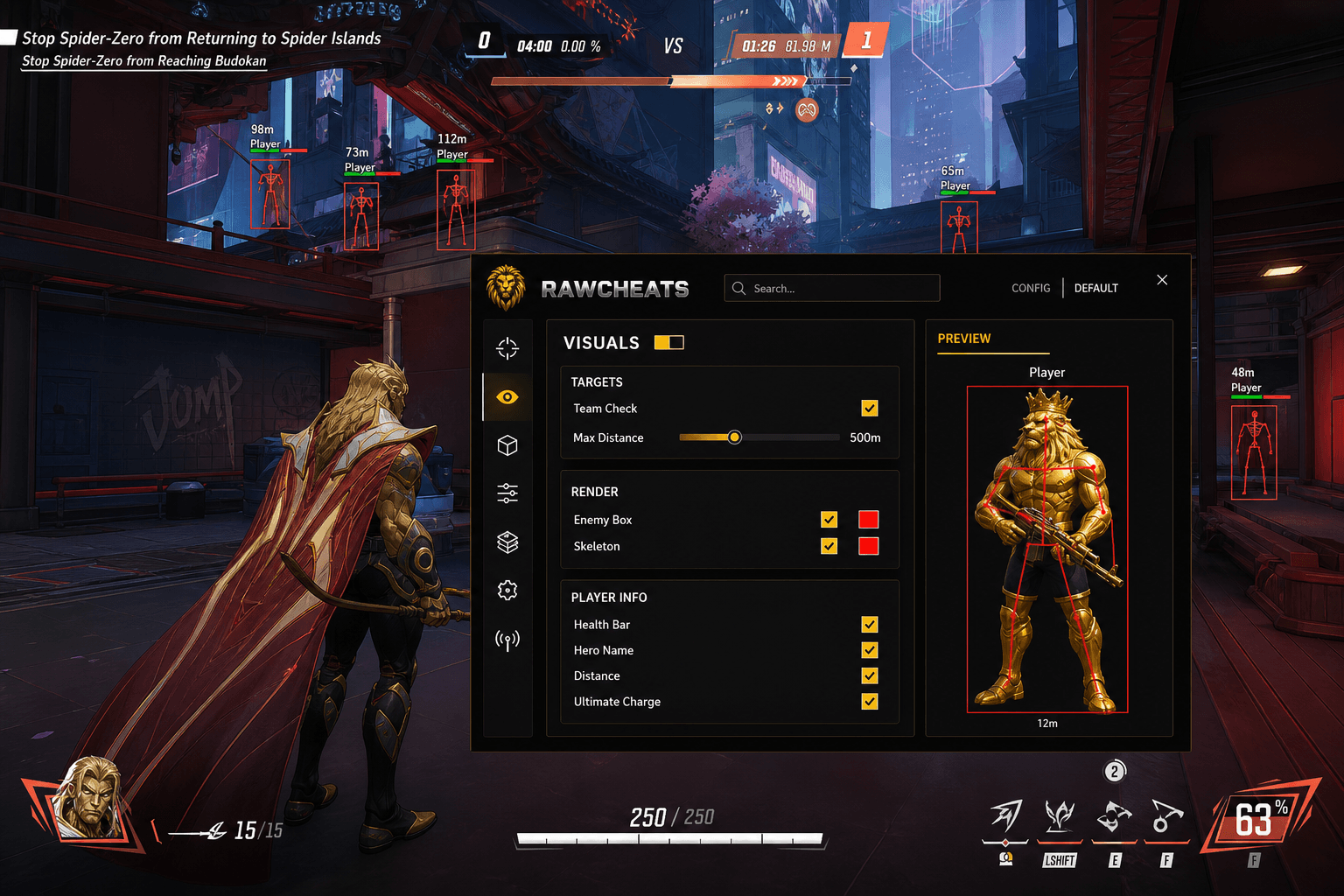
The Ultimate Charge tracker is the genre-defining hero-shooter ESP feature. Plus the full Marvel Rivals ESP feature set: box, skeleton, health, hero name, distance.
The single most-valuable piece of information you can have in a Marvel Rivals match is the exact ultimate-charge percentage of every enemy on the team. Knowing Mantis is at 92% and Luna Snow is at 76% tells you the dive window opens in roughly 8 seconds. Knowing Hela's at 100% but Strange's at 30% tells you to push now before the AOE save comes online. The Ultimate Charge tracker isn't a nice-to-have ESP toggle — it's the hero-shooter-defining wallhack feature, and every Marvel Rivals cheat that ships without it is shipping a 60% product.
This post is a cluster of the Marvel Rivals Cheats Complete 2026 Guide pillar. The pillar covered why hero-shooter ESP is genre-specific. This piece is the feature-by-feature walkthrough of the Raw Rivals ESP menu — every toggle, what it shows, and how to tune it for ranked play without lighting up your screen like a Christmas tree.
Why hero shooter ESP is different from standard FPS wallhacks
Generic FPS ESP shows you player boxes, skeletons, names, and distance. That's table stakes — every cheat from CS2 to Valorant ships those features. Hero shooter ESP needs the per-role layer on top of that, and the most important piece is real-time visibility into each enemy's ultimate charge state.
Marvel Rivals' team-fight tempo is dictated by ultimate availability. A team fight where both sides have full ult bars is a coin flip — whoever pops their AOE save / damage ult first wins. A team fight where your side has full ults and their Strategists are at 40% is a guaranteed win. Knowing the ult state lets you choose engagements rather than commit to them blind.
In Marvel Rivals' default UI, you can see your own team's ult charges (visible in your HUD). You cannot see enemy ult charges. The enemy team's ult state is the single most-valuable piece of information you don't have access to as a normal player. The Ultimate Charge ESP toggle gives you that visibility.
This is the genre-specific feature. ESP boxes / skeletons / health bars exist on every shooter cheat ever shipped — they're commodity features. Ult tracking is the Marvel-Rivals-specific piece, and getting it right is what separates a serious Marvel Rivals cheat from a generic FPS aimbot with role labels slapped on.
The Raw Rivals Visuals menu — feature by feature
Two sub-tabs: Players and World. Marvel Rivals' world geometry is sparse compared to a survival game like Rust (no loot ESP, no item highlighting beyond Health Packs), so the menu is correspondingly lean.
Players sub-tab — three sections
TARGETS section — controls what enemies the ESP system considers for rendering.
- Team Check toggle — when ON, ESP only renders enemies (filters out your teammates). When OFF, both teams render. Default ON for ranked; OFF if you're learning enemy hero positioning patterns in custom games.
- Max Distance slider — 0-500m. Enemies outside this radius don't render. The default 100m covers the vast majority of Marvel Rivals engagement ranges; 200-300m is useful on the Tokyo 2099 / Spider-Islands maps where the verticality and skybox sightlines stretch engagement distances. Above 300m, you're getting noise on your screen for distant non-threats.
RENDER section — the visual primitives for each enemy.
- Enemy Box toggle + color picker — draws a 2D bounding box around each enemy. The Box style is a single outlined rectangle in the chosen color (default red). For 2026 detection-window safety, the default box is what we ship. Filled box and cornered box variants exist as alternate styles — see the Raw Rivals product page for the current style list.
- Skeleton toggle + color picker — draws the enemy's skeleton (bone-by-bone line rendering) in the chosen color. Skeleton ESP makes hero animations readable — you can see exactly when an enemy is winding up an ability, mid-dash, or stunned. Default red color matches the Box.
PLAYER INFO section — text overlays per enemy.
- Health Bar toggle — renders the enemy's current HP as a horizontal bar above their box. Color-coded green/yellow/red. Critical for knowing who's one-shottable and for picking your dive target.
- Hero Name toggle — labels each enemy with their hero name (Hela, Mantis, etc.). Combined with the team comp readout, you know exactly who you're facing without guessing from silhouettes.
- Distance toggle — meters from your character to the enemy. Critical for projectile prediction sanity-check (e.g., is your shot in optimal Hawkeye range?) and for understanding when an enemy is about to engage you.
- Ultimate Charge toggle — the marquee feature. Renders each enemy's exact ult percentage as text alongside their nameplate. Tells you when to push, when to bait, when to disengage.
World sub-tab
Sparser than the Players tab — Marvel Rivals doesn't have a complex loot economy like Rust.
- Health Packs toggle + Max Distance slider — highlights health pack spawns on the map. Useful for low-HP rotations, particularly on the larger maps where pack positioning isn't memorized. Max distance defaults to 50m (only nearby packs render).
The animated ESP preview character
When you toggle ESP options in the menu, a 3D character renders the active settings live before you queue. Box style, skeleton color, hero name, distance, health bar, ultimate charge — all visible on a preview model rotating in the menu pane. This is a shared SDK feature you can also see on Raw Fortnite, Raw Rust, and the rest of the RawCheats lineup. The visual confirmation saves you from queuing a match to discover your colors are wrong or your text overlay is unreadable.
The Ultimate Charge tracker — how it works
Architecturally, ult charge is server-authoritative data — the Marvel Rivals server tracks each player's ult progression and broadcasts it to teammates (you can see your own team's ult bars). The protocol packets that broadcast team ult state also contain enemy ult state for legitimate reasons (replay system, post-match stats, the killcam needing to know what ult killed you). The cheat reads the broadcast packets and renders the enemy ult state alongside the team ult state.
This is similar to how skeleton ESP works on every kernel-AC FPS — the data exists in the client's memory because the client needs it for legitimate purposes, and the ESP layer surfaces it visually.
Refresh rate — the Raw Rivals ult tracker updates per server tick (~60 Hz). Lag in the readout is minimal; you see ult charge changes essentially in real time.
Precision — exact integer percentage (87%, not "almost full"). The precision is the value-add. Knowing Mantis is at 87% vs 92% is the difference between "dive now" and "wait 4 seconds, then dive."
Ult-popping animation timing — when an enemy pops their ult, the tracker reads it the moment the ult cast starts. You see the ult enter cast state before you see the visual effect, which gives you the ~250-400ms window to react (counter with your own ult, disengage, position safety).
Predictive ult-charge — the next-step feature
Beyond raw ult-percentage display, the predictive ult-charge feature (in active development across the shared SDK) extrapolates when an enemy ult will be available based on:
- Current charge percentage
- Their hero's ult cost
- Their team-fight presence (charge accrues faster in active fights)
- The hero's recent damage output
This is forward-looking — the prediction algorithm is on the roadmap as a shared SDK improvement and will land across all Raw products simultaneously when it ships. For now, the raw percentage readout plus mental math on team-fight pace covers 95% of the practical use case. If you know Mantis is at 70% and she's been actively healing for the last 8 seconds, she's probably ult-ready in another 8-12 seconds.
Ability cooldown ESP — what we don't ship and why
Some competitor marketing claims "ability cooldown ESP" — visibility into when each enemy ability is on cooldown. Raw Rivals does not ship this feature. The reason: ability cooldowns are largely client-side on Marvel Rivals (the server tracks the cooldown but the client manages the UI), and reading another player's client-side cooldown state is more anti-cheat-noisy than reading server-authoritative ult charge. The detection risk-reward doesn't favor shipping the feature.
Practically, you don't need ability cooldown ESP if you know Mantis's ult is ready in 5 seconds — that's the meta-impact information. Knowing her sleep grenade is off cooldown in 3 seconds is fine information but it's not what wins fights.
A cheat vendor claiming ability cooldown ESP should be asked for video proof in a live match. The feature is rare and the marketing claim is often unsupported.
ESP color discipline — keeping your screen readable
Default colors ship sensible: enemy boxes in red, skeleton in red, health bar color-coded by percentage. The temptation when you first install the cheat is to color-everything-everything because the menu lets you. Resist this. Cluttered ESP hurts your gameplay more than clean ESP helps.
Recommended color scheme for ranked play:
- Enemy Box: red (default)
- Skeleton: off OR thin gray (low contrast on dynamic gameplay)
- Health Bar: color-coded (default)
- Hero Name: white text with dark outline
- Distance: same white text
- Ultimate Charge: orange/yellow when above 80%, neutral white below
The Ultimate Charge color-by-threshold is the highest-leverage visual signal — your eye picks up the orange-when-near-ult-ready cue at peripheral attention. You don't need to consciously read 87% — you see "the Mantis line is yellow" and you know.
For tournament play, dial back further — Enemy Box only, Hero Name on, Ultimate Charge on, everything else off. Skeleton and Health Bar are luxuries you can't afford visually when spectator cams are watching.
ESP and the visible-only aim filter — how they interact
ESP and visible-only aim are separate systems. ESP renders enemies through walls; visible-only aim refuses to fire at enemies behind walls. This is the standard design — you can see enemies through walls but you can't shoot them through walls unless you have line of sight.
The benefit: you have full positional awareness of the enemy team (you know where they all are, who's grouped with whom, who's flanking) without your aimbot magnetizing at occluded targets. This positioning advantage is the legitimate edge — it's the difference between always knowing what's around the next corner and walking blind into a 5-stack.
The aimbot settings cluster covers visible-only filtering in detail. The short version: visible-only ON for ranked / tournament, OFF for casual where you want the through-wall awareness in the aim UI without the constraint.
ESP risk profile — what gets caught
ESP rendering is conceptually a draw call to your video card overlaid on the game's render output. NeacSafe's kernel scanner doesn't watch your GPU's frame buffer (it can't — the frame buffer is GPU memory, not system memory accessible to the kernel scanner). So the rendering itself isn't a detection surface.
What gets caught: the reading of player position / ult / health data from the game's memory. This is the read side of ESP, and it has a kernel-AC detection surface (NeacSafe's memory scanner can flag patterns of "unusual process reading game memory"). Defeating this is the in-house bypass engineering that Raw Rivals is built around.
External-process ESP (Raw Rivals' design) is meaningfully harder for NeacSafe to detect than injected ESP because the AC's primary scan surface is the game process's memory, not external processes. Combined with kernel-level bypass for the memory-read side, the detection windows on external ESP have held across multiple NeacSafe driver updates. The cluster How Marvel Rivals' anti-cheat works covers the technical specifics.
Season 8 ESP readiness — new heroes, new ESP work
Season 8 "Sins of Alchemax" launches May 15, 2026 with Devil Dinosaur as the 50th hero; Cyclops drops at S8.5. ESP coverage for new heroes requires three updates:
- Hitbox profile — the new hero's bounding box for Box rendering
- Skeleton mapping — the bone hierarchy for Skeleton rendering
- Hero Name + Role labels — the new hero's name and role identifier
These updates are part of the standard patch-day workflow. The Marvel Rivals cheat status page tracks build versions during S8 patch week.
Devil Dinosaur — Vanguard class per datamine. Significantly larger model than even the current megahit-box Vanguards, so the bounding box rendering needs adjustment. Skeleton is unusual (quadruped frame; standard humanoid skeleton mapping doesn't apply). Expected to land with the S8 patch within 6-12 hours of the patch shipping.
Cyclops — Hitscan duelist (S8.5). Standard humanoid skeleton, standard hitbox sizing. ESP work for Cyclops is incremental.
The new Alchemax HQ map — introduces Chronovium kinetic-force objects as a map mechanic. We have not committed to adding Chronovium object ESP; the feature would need to clear the risk-reward analysis (server-side authoritative? client-side cached? what's the detection surface?). The current default ship is no Chronovium object ESP at launch; we'll re-evaluate post-patch.
Wrap
ESP on Marvel Rivals is dictated by one feature — Ultimate Charge tracking — and a handful of standard FPS-wallhack staples (boxes, skeletons, names, health, distance). The Marvel Rivals-specific value isn't in shipping ten ESP toggles; it's in shipping the ult tracker correctly and pairing it with conservative visual color discipline.
Raw Rivals ships the full ESP feature set including Ultimate Charge by default, the animated preview character for visualization, and the shared SDK improvements that roll across the RawCheats lineup. The pillar Marvel Rivals Cheats Complete 2026 Guide covers the broader product context; the aimbot settings cluster covers the aim side of the package. The two systems combined are what the product is.
